> ## Documentation Index
> Fetch the complete documentation index at: https://docs.vowen.ai/llms.txt
> Use this file to discover all available pages before exploring further.
# Setting Up AI
> Connect your AI provider to enable enhancement and Command Mode.
## Overview
Vowen uses AI in two ways:
1. **[AI Enhancement](/ai-features/ai-enhancement)**: polishes your transcriptions (grammar, formatting)
2. **[Command Mode](/ai-features/command-mode)**: processes voice instructions with full AI capabilities
Both require connecting an AI provider with your own API key. Vowen never charges you for AI usage; you pay your provider directly (many have generous free tiers).
## Supported Providers
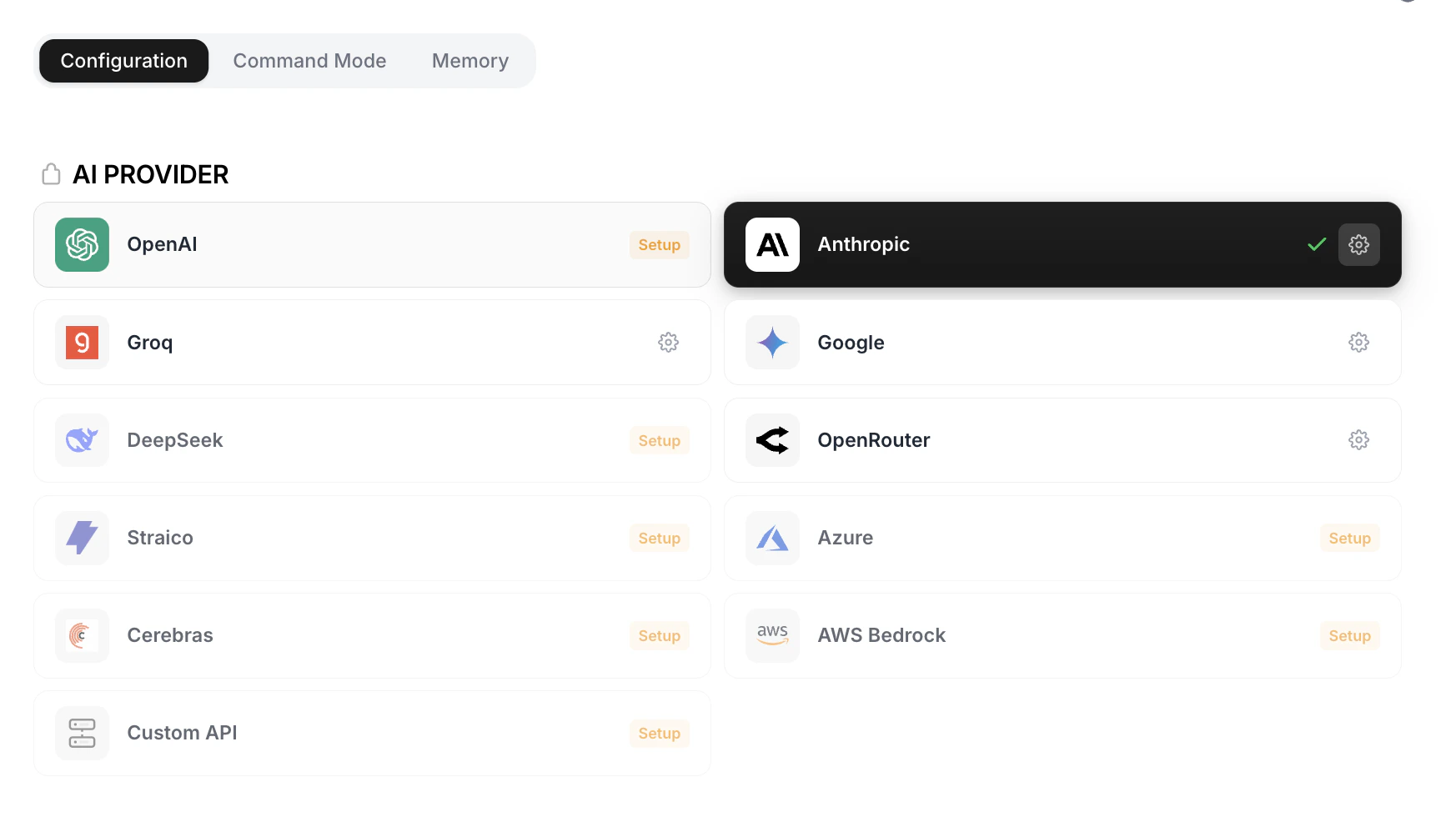
Vowen supports 11 providers. Click any provider name in the table to go directly to the page where you generate an API key.
 | Provider | Free Tier | Best For | Recommended Model |
| ------------------------------------------------------------------------------------------------------- | -------------- | ------------------------------------------ | ----------------------- |
| [**OpenAI**](https://platform.openai.com/api-keys) | No (paid) | Best overall quality | GPT-5.4 Nano |
| [**Anthropic**](https://console.anthropic.com/settings/keys) | No (paid) | Nuanced writing | Claude Haiku 4.5 |
| [**Groq**](https://console.groq.com/keys) | Yes (generous) | Fast responses, free usage | Llama 3.3 70B Versatile |
| [**Google**](https://aistudio.google.com/app/apikey) | Yes (generous) | Image/video context, free usage | Gemini 2.5 Flash Lite |
| [**DeepSeek**](https://platform.deepseek.com/api_keys) | Yes (limited) | Budget-friendly | DeepSeek Chat |
| [**OpenRouter**](https://openrouter.ai/keys) | Varies | Access to 700+ models | Gemini 2.0 Flash (free) |
| [**Straico**](https://platform.straico.com/settings-api) | Varies | Multi-model access | Amazon Nova Micro |
| [**Azure**](https://portal.azure.com/#view/Microsoft_Azure_ProjectOxford/CognitiveServicesHub/~/OpenAI) | No (paid) | Enterprise compliance | GPT-4.1 Nano |
| [**Cerebras**](https://cloud.cerebras.ai/platform) | Yes (limited) | Ultra-fast inference | Llama 3.1 8B |
| [**AWS Bedrock**](https://us-east-1.console.aws.amazon.com/bedrock/home#/api-keys) | No (paid) | Enterprise, regional | Amazon Nova Lite |
| **Custom API** (Pro) | Varies | Self-hosted or OpenAI-compatible endpoints | Your choice |
The free plan supports one configured provider at a time. [Custom API](#custom-api-setup) and adding multiple providers as backups both require Pro.
## Setup Steps
Go to **Settings > AI Setup**.
Each provider card has a **Setup** button. Click it to open the configuration popup.
Enter the key from the provider's dashboard. The popup also has a **"See how to retrieve API key here"** link that opens the provider's API key page in your browser.
| Provider | Free Tier | Best For | Recommended Model |
| ------------------------------------------------------------------------------------------------------- | -------------- | ------------------------------------------ | ----------------------- |
| [**OpenAI**](https://platform.openai.com/api-keys) | No (paid) | Best overall quality | GPT-5.4 Nano |
| [**Anthropic**](https://console.anthropic.com/settings/keys) | No (paid) | Nuanced writing | Claude Haiku 4.5 |
| [**Groq**](https://console.groq.com/keys) | Yes (generous) | Fast responses, free usage | Llama 3.3 70B Versatile |
| [**Google**](https://aistudio.google.com/app/apikey) | Yes (generous) | Image/video context, free usage | Gemini 2.5 Flash Lite |
| [**DeepSeek**](https://platform.deepseek.com/api_keys) | Yes (limited) | Budget-friendly | DeepSeek Chat |
| [**OpenRouter**](https://openrouter.ai/keys) | Varies | Access to 700+ models | Gemini 2.0 Flash (free) |
| [**Straico**](https://platform.straico.com/settings-api) | Varies | Multi-model access | Amazon Nova Micro |
| [**Azure**](https://portal.azure.com/#view/Microsoft_Azure_ProjectOxford/CognitiveServicesHub/~/OpenAI) | No (paid) | Enterprise compliance | GPT-4.1 Nano |
| [**Cerebras**](https://cloud.cerebras.ai/platform) | Yes (limited) | Ultra-fast inference | Llama 3.1 8B |
| [**AWS Bedrock**](https://us-east-1.console.aws.amazon.com/bedrock/home#/api-keys) | No (paid) | Enterprise, regional | Amazon Nova Lite |
| **Custom API** (Pro) | Varies | Self-hosted or OpenAI-compatible endpoints | Your choice |
The free plan supports one configured provider at a time. [Custom API](#custom-api-setup) and adding multiple providers as backups both require Pro.
## Setup Steps
Go to **Settings > AI Setup**.
Each provider card has a **Setup** button. Click it to open the configuration popup.
Enter the key from the provider's dashboard. The popup also has a **"See how to retrieve API key here"** link that opens the provider's API key page in your browser.
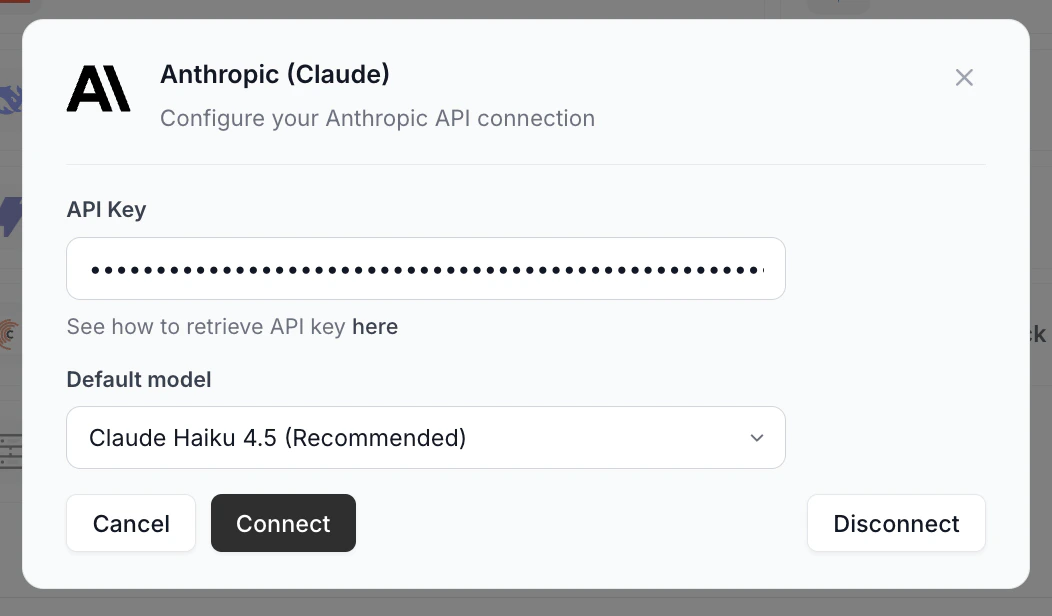 Your API key is encrypted at rest using your operating system's secure storage (Keychain on macOS, DPAPI on Windows).
Choose from the dropdown. The recommended model is pre-selected. Different models offer different speed, quality, and cost trade-offs.
Vowen verifies the key and saves it. A green check on the provider card means it's the active connection.
### Custom API setup
The **Custom API** provider works with any OpenAI-compatible endpoint (Ollama, LM Studio, vLLM, self-hosted models, internal gateways). Its setup popup has one extra field.
Your API key is encrypted at rest using your operating system's secure storage (Keychain on macOS, DPAPI on Windows).
Choose from the dropdown. The recommended model is pre-selected. Different models offer different speed, quality, and cost trade-offs.
Vowen verifies the key and saves it. A green check on the provider card means it's the active connection.
### Custom API setup
The **Custom API** provider works with any OpenAI-compatible endpoint (Ollama, LM Studio, vLLM, self-hosted models, internal gateways). Its setup popup has one extra field.
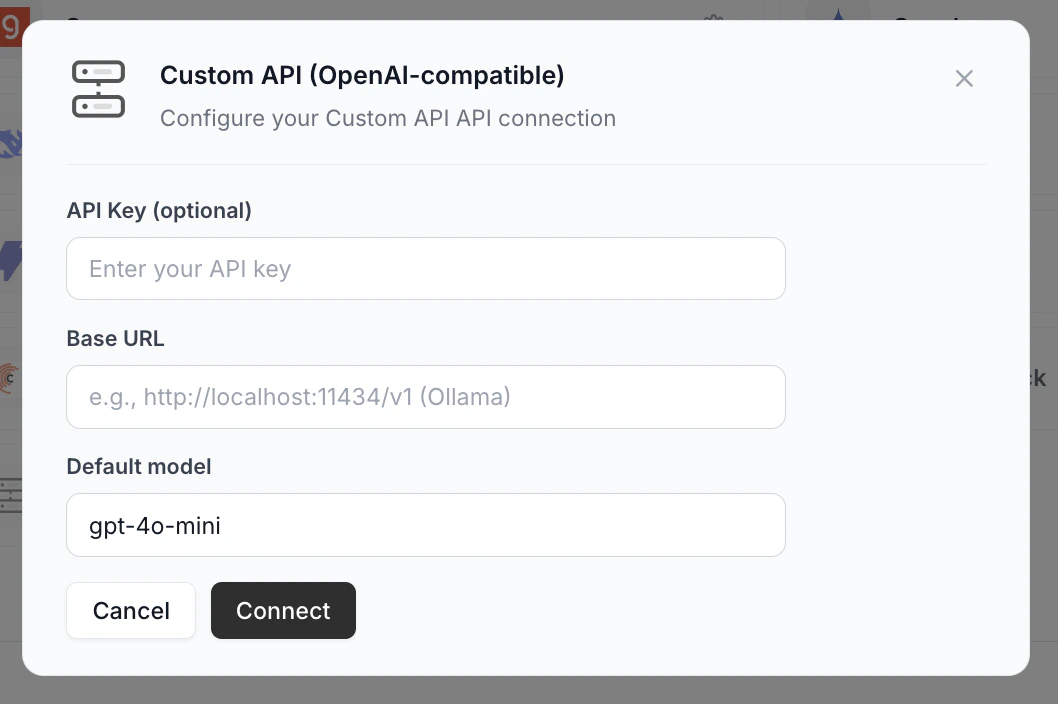 * **API Key (optional)**: leave blank if your endpoint doesn't require auth.
* **Base URL** (required): point at your endpoint, e.g., `http://localhost:11434/v1` for Ollama.
* **Default model**: the model identifier your endpoint expects (e.g., `gpt-4o-mini`, `llama3.1`).
**Pro tip:** Want fully local AI? Install Ollama, run a model like `llama3.1`, point Base URL at `http://localhost:11434/v1` and leave the API key blank. No data leaves your machine.
### Disconnecting a provider
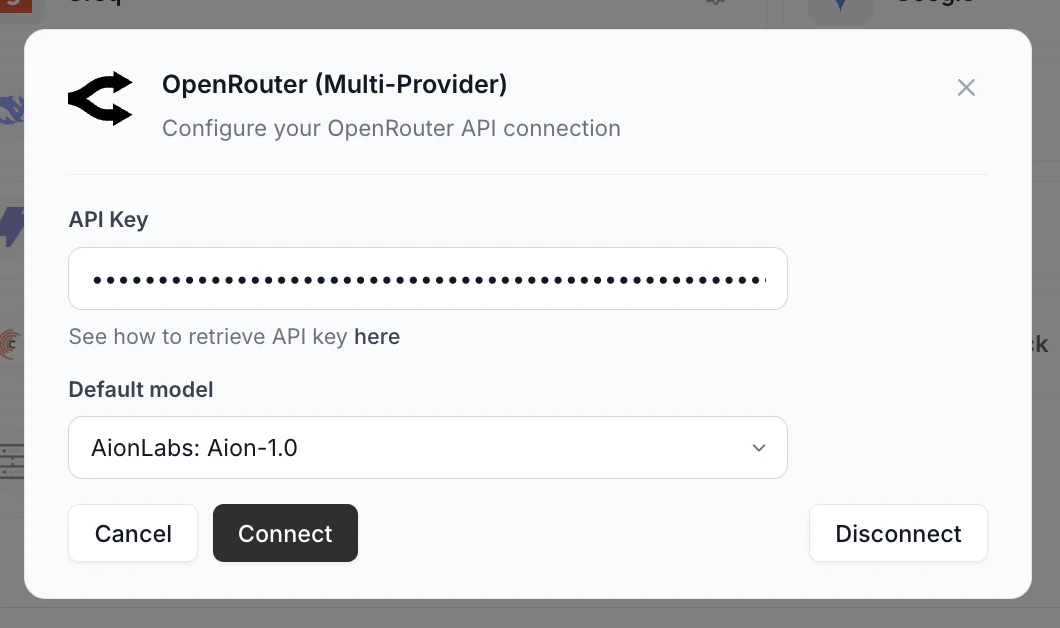
Open the Setup popup on a connected provider (its card has a gear icon and a green check). A **Disconnect** button appears in the bottom right. Click it to remove the key and clear the active connection.
* **API Key (optional)**: leave blank if your endpoint doesn't require auth.
* **Base URL** (required): point at your endpoint, e.g., `http://localhost:11434/v1` for Ollama.
* **Default model**: the model identifier your endpoint expects (e.g., `gpt-4o-mini`, `llama3.1`).
**Pro tip:** Want fully local AI? Install Ollama, run a model like `llama3.1`, point Base URL at `http://localhost:11434/v1` and leave the API key blank. No data leaves your machine.
### Disconnecting a provider
Open the Setup popup on a connected provider (its card has a gear icon and a green check). A **Disconnect** button appears in the bottom right. Click it to remove the key and clear the active connection.
 ## Where to Get API Keys
Each card opens the provider's developer console where you sign up and generate a key.
### Free tier
Generous free tier. Ideal for daily dictation.
Generous free tier with multimodal support.
Free tier with ultra-fast inference.
Free tier with limited monthly tokens.
### Paid
Requires payment method. Top overall quality.
Requires funded credits. Starter credits on signup.
Requires Azure subscription. Enterprise compliance.
Requires AWS account. Enable models, create key.
**Pro tip:** Most paid providers let you cap monthly spend per API key. Set it to your daily-use ceiling so a runaway loop can't drain your wallet.
### Multi-provider gateways
One key, 700+ models. Several free options.
One key, multiple providers. Prepaid credits.
### Self-hosted
Point Vowen at any OpenAI-compatible endpoint. Works with Ollama, LM Studio, vLLM, and self-hosted models.
## Switching Providers
Configuring more than one provider is recommended. AI APIs occasionally go down or hit rate limits, and having a second provider connected means you can switch in seconds instead of scrambling to set up a new key mid-outage.
* The active provider shows a green check on its card
* Click any configured provider to make it active
* API keys stay saved, so no need to re-enter them when switching
* If your active provider has an outage, switching to a configured backup is one click away
Set up Groq plus Google as a backup. Both have generous free tiers, so a redundant configuration costs nothing.
## Model Selection
After connecting a provider, click the gear icon on the provider card to select which model to use. Models vary in:
* **Speed**: how quickly responses come back
* **Quality**: how well it follows instructions and formats text
* **Cost**: per-token pricing (relevant for paid providers)
For AI Enhancement (light cleanup), even the smallest/cheapest models work well. For Command Mode (complex instructions), use larger models.
**Pro tip:** Configuring one beefy model for both Enhancement and Command Mode wastes tokens on light cleanup. Run a small/cheap model as your active default and use a Tone to bump it up for Command Mode contexts.
## Rate Limits
If you hit rate limits (especially on free tiers):
* Switch between providers (e.g., alternate between Groq and Gemini)
* Use a larger model that has higher limits
* Wait a few minutes for limits to reset
* Consider upgrading to a paid tier for heavy usage
## Security
Your API keys are:
* **Encrypted at rest** using your OS's secure keystore (Keychain or DPAPI)
* **Never sent to Vowen servers**, only to your selected AI provider
* **Stored locally** on your machine, never on our infrastructure
**Pro tip:** Generate a separate API key just for Vowen. If it ever leaks (synced screenshot, posted env file), revoke just that one without breaking ChatGPT, Cursor, or anything else on the same account.
## Where to Get API Keys
Each card opens the provider's developer console where you sign up and generate a key.
### Free tier
Generous free tier. Ideal for daily dictation.
Generous free tier with multimodal support.
Free tier with ultra-fast inference.
Free tier with limited monthly tokens.
### Paid
Requires payment method. Top overall quality.
Requires funded credits. Starter credits on signup.
Requires Azure subscription. Enterprise compliance.
Requires AWS account. Enable models, create key.
**Pro tip:** Most paid providers let you cap monthly spend per API key. Set it to your daily-use ceiling so a runaway loop can't drain your wallet.
### Multi-provider gateways
One key, 700+ models. Several free options.
One key, multiple providers. Prepaid credits.
### Self-hosted
Point Vowen at any OpenAI-compatible endpoint. Works with Ollama, LM Studio, vLLM, and self-hosted models.
## Switching Providers
Configuring more than one provider is recommended. AI APIs occasionally go down or hit rate limits, and having a second provider connected means you can switch in seconds instead of scrambling to set up a new key mid-outage.
* The active provider shows a green check on its card
* Click any configured provider to make it active
* API keys stay saved, so no need to re-enter them when switching
* If your active provider has an outage, switching to a configured backup is one click away
Set up Groq plus Google as a backup. Both have generous free tiers, so a redundant configuration costs nothing.
## Model Selection
After connecting a provider, click the gear icon on the provider card to select which model to use. Models vary in:
* **Speed**: how quickly responses come back
* **Quality**: how well it follows instructions and formats text
* **Cost**: per-token pricing (relevant for paid providers)
For AI Enhancement (light cleanup), even the smallest/cheapest models work well. For Command Mode (complex instructions), use larger models.
**Pro tip:** Configuring one beefy model for both Enhancement and Command Mode wastes tokens on light cleanup. Run a small/cheap model as your active default and use a Tone to bump it up for Command Mode contexts.
## Rate Limits
If you hit rate limits (especially on free tiers):
* Switch between providers (e.g., alternate between Groq and Gemini)
* Use a larger model that has higher limits
* Wait a few minutes for limits to reset
* Consider upgrading to a paid tier for heavy usage
## Security
Your API keys are:
* **Encrypted at rest** using your OS's secure keystore (Keychain or DPAPI)
* **Never sent to Vowen servers**, only to your selected AI provider
* **Stored locally** on your machine, never on our infrastructure
**Pro tip:** Generate a separate API key just for Vowen. If it ever leaks (synced screenshot, posted env file), revoke just that one without breaking ChatGPT, Cursor, or anything else on the same account.