
What normal looks like
Vowen is idle between recordings. There is no background transcription, no continuous listening, and no polling of your audio device when you are not dictating. Memory use is dominated by which speech model is loaded. A local model is held in memory between dictations so the next one starts instantly. A large Whisper model costs substantially more resident memory than a small one, and a cloud model costs none at all because nothing runs locally. CPU is close to zero when idle. It spikes for the duration of a transcription and drops straight back.Vowen does not publish measured RAM or CPU figures, and any specific numbers you have seen for it are approximations rather than measurements. Use the relative guidance on this page rather than targeting a number.
Transcription is slow
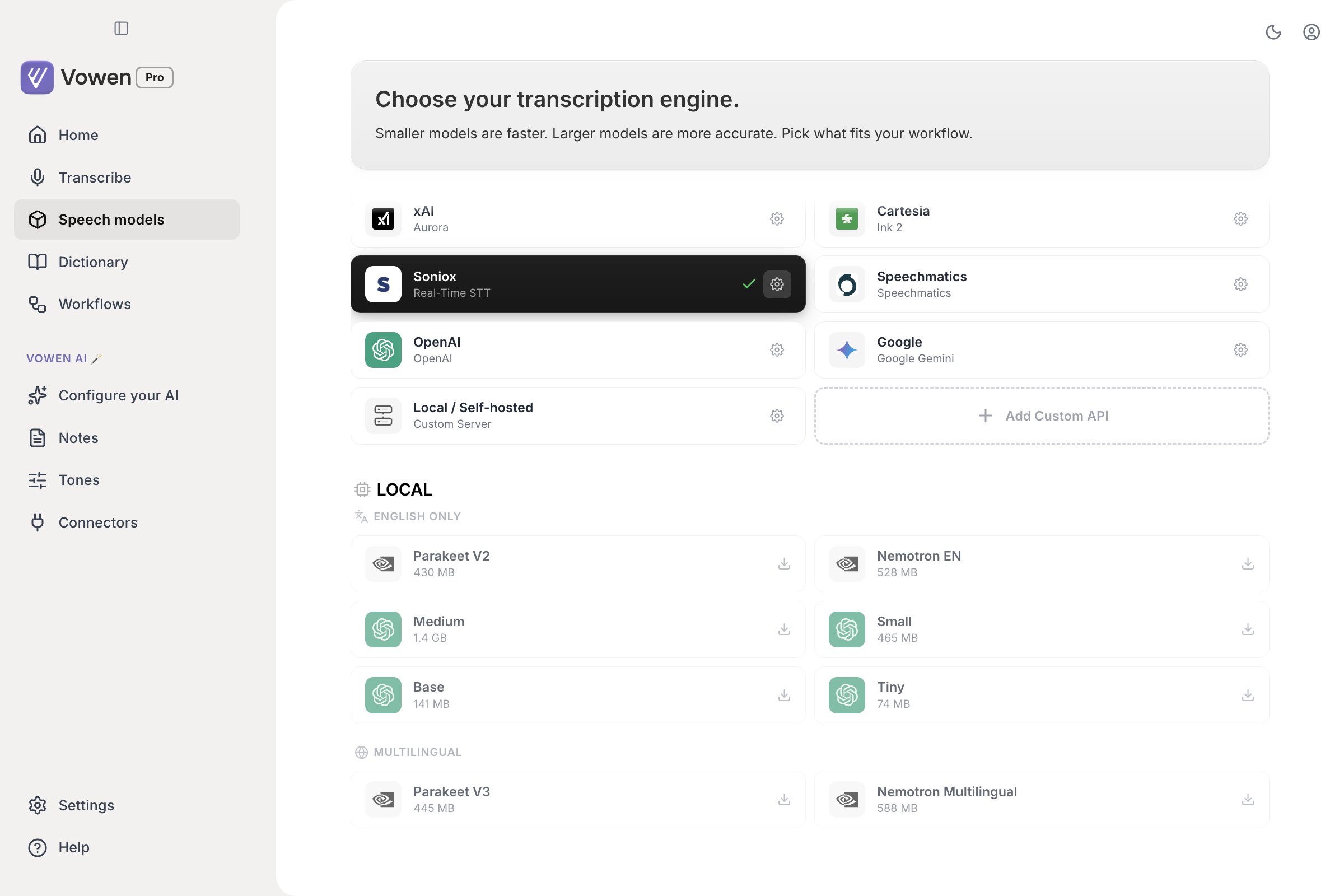
Model size and speed trade off directly. The Local section shows each model's download size.
- Windows
- macOS
Local models are CPU-bound on Windows unless you enable GPU acceleration.
- Enable GPU acceleration. Go to the Speech models page in the left sidebar and find the GPU Acceleration section. The NVIDIA CUDA card is offered on Windows machines with an NVIDIA GPU, requires an RTX 2000 series card or newer, downloads roughly 631 MB, and needs no separate CUDA install.
- Use Parakeet. Parakeet V2 (English) and V3 (25 European languages) are the fastest local option on Windows.
- Use a cloud model. Groq is fast and has a free tier.
- Use a smaller Whisper model if you are on Whisper. Tiny or Base instead of Medium or Large.
With cloud models
If cloud transcription feels slow:- Check your connection, and confirm Settings > Developer > Prefer IPv4 Connections is on. A network that advertises IPv6 but cannot route it turns every request into a timeout before it retries.
- Try a different provider. Providers have busy periods.
- Long recordings take longer, and some providers chunk long audio before uploading it.
AI enhancement adds to the total
If the delay is after transcription rather than during it, the AI enhancement step is the cost, not the speech model. See AI and API Issues.High memory usage
Why it happens
The speech model stays loaded between dictations so the next one starts immediately. This is deliberate. Unloading it after every use would make every dictation pay the load cost again.Reducing it
- Switch to a smaller model. This is by far the largest lever. Whisper Base uses a small fraction of what Large v3 uses.
- Switch to Parakeet or Nemotron. Both are around 0.6B parameters and considerably lighter than large Whisper models, while being faster and, for most speech, more accurate.
- Turn on Settings > General > Resource efficient mode. This loads the model only when it is needed and releases it afterwards. Dictations become slower in exchange for lower idle memory.
- Use a cloud model. Nothing stays resident locally.
Resource efficient mode only appears where it can do something: with a Whisper model selected, or on Windows with a Parakeet model. It is hidden for cloud models and for Parakeet on macOS, where the warm daemon has no one-shot path to fall back to.
Laptop running warm
Warmth during active transcription is expected. The model is working hard, and it stops the moment transcription finishes. If your machine runs warm while Vowen is idle:- Check Activity Monitor or Task Manager for Vowen’s actual CPU share, so you know whether it is Vowen at all
- Restart Vowen to clear any stuck helper process
- If you use Meeting Notes, check whether a session is still running. Meeting recording keeps the microphone, and on macOS the system audio tap, open for the whole session.
- Report it on Discord with your model configuration
Battery
Vowen has minimal battery impact when idle. During a transcription it briefly uses significant CPU, but a typical dictation lasts seconds. For laptop users:- Cloud models move the work off your machine entirely, at the cost of sending audio to a provider
- Parakeet and Nemotron are built for Apple silicon and are far more power-efficient than the alternatives
- Smaller models use less energy per dictation
- Resource efficient mode trades speed for a smaller resident footprint
Related pages
Speech models
Which model to pick, and what each one costs to run.
Common issues
Stuck recordings, dead shortcuts, and wake-from-sleep problems.