
Nothing happens when I press the Command Mode shortcut
Symptoms: You press the Command Mode shortcut (Alt + Shift by default on both platforms) and absolutely nothing happens. No banner, no sound, no indicator, no error.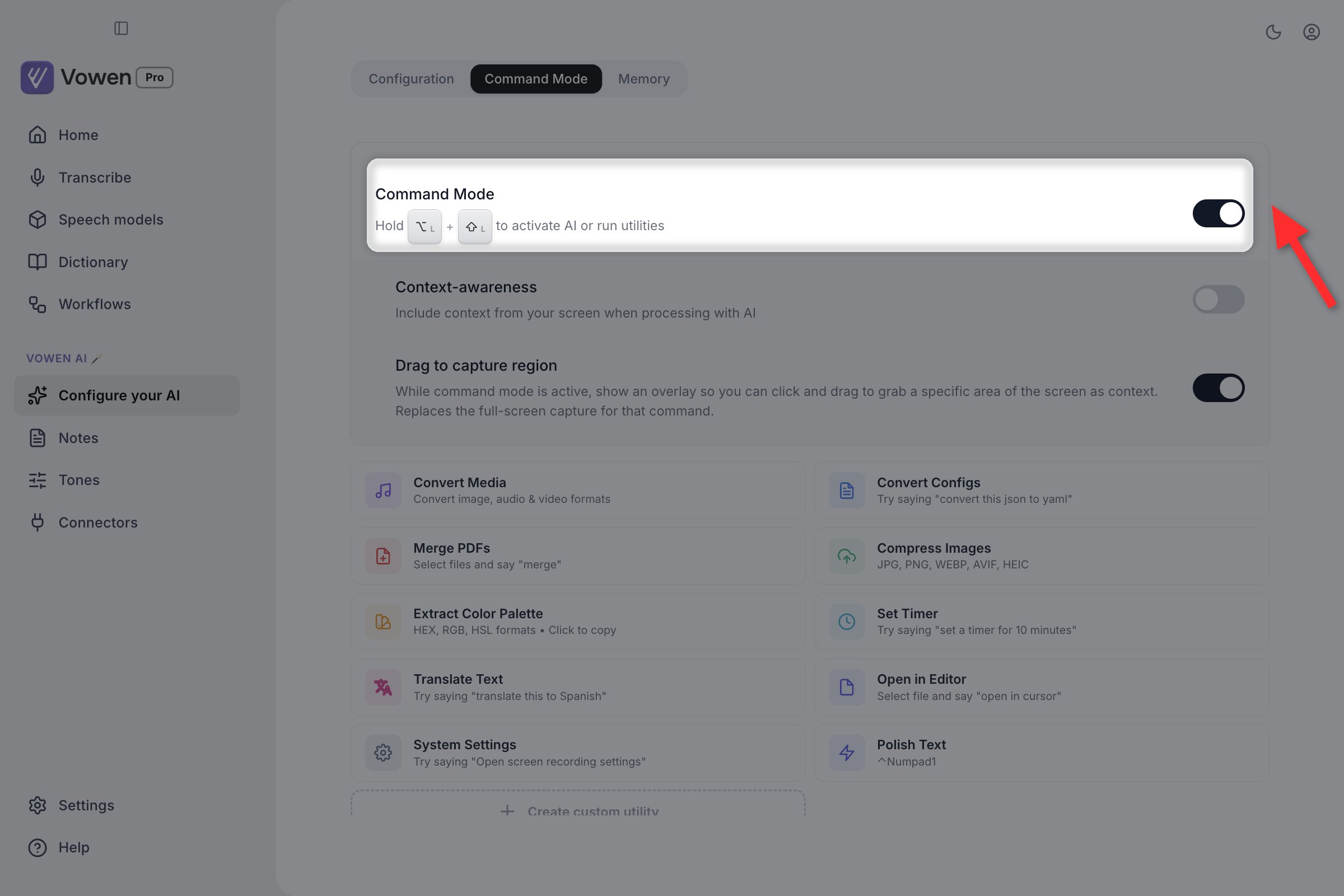
Command Mode has its own master switch on the Command Mode tab of Configure your AI. It is off by default.
1
Open Configure your AI
In the left sidebar, under Vowen AI, click Configure your AI.
2
Go to the Command Mode tab
The page has three tabs: Configuration, Command Mode and Memory. Open Command Mode.
3
Turn on the Command Mode checkbox
The toggle is labeled Command Mode at the top of the tab.
If you have not connected an AI provider yet, the toggle is not there at all. Instead you will see a locked card with a Connect an AI provider button. Connect a provider on the Configuration tab first, then come back.If you are on the Free plan and have used your daily Command Mode allowance, the toggle is greyed out until the cap resets.
Text not pasting
Symptoms: The transcription appears in the Voice Log but never lands in your app.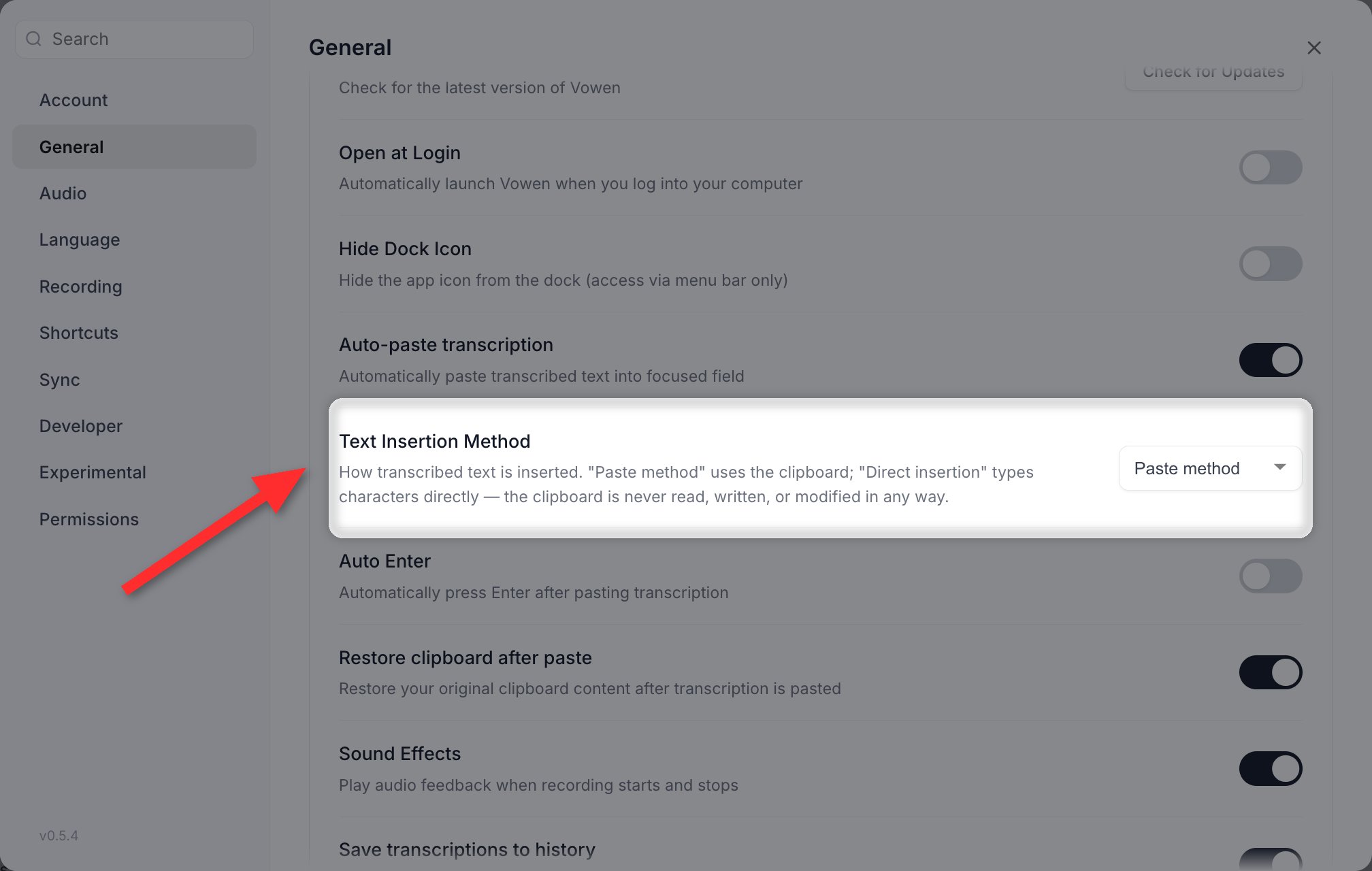
Text Insertion Method, in Settings > General. Switching to Direct insertion bypasses the clipboard entirely.
- Check that Settings > General > Auto-paste transcription is on. It is on by default, and it gates the two settings below it.
- Make sure the target app has a text field with focus.
- On macOS, confirm Accessibility permission is granted, then fully quit and relaunch Vowen.
- Try the other insertion method: Settings > General > Text Insertion Method, switching between Paste method and Direct insertion.
- Fully quit Vowen (right-click the tray icon, then Quit) and relaunch.
On Windows, Direct insertion is marked Beta and carries the warning “May have issues on non-standard keyboard layouts”.
A “Drag to insert” card appears instead of the text
Symptoms: After a dictation on macOS, a small card appears showing your transcript with a hand icon and a Copy button, instead of the text going into an app.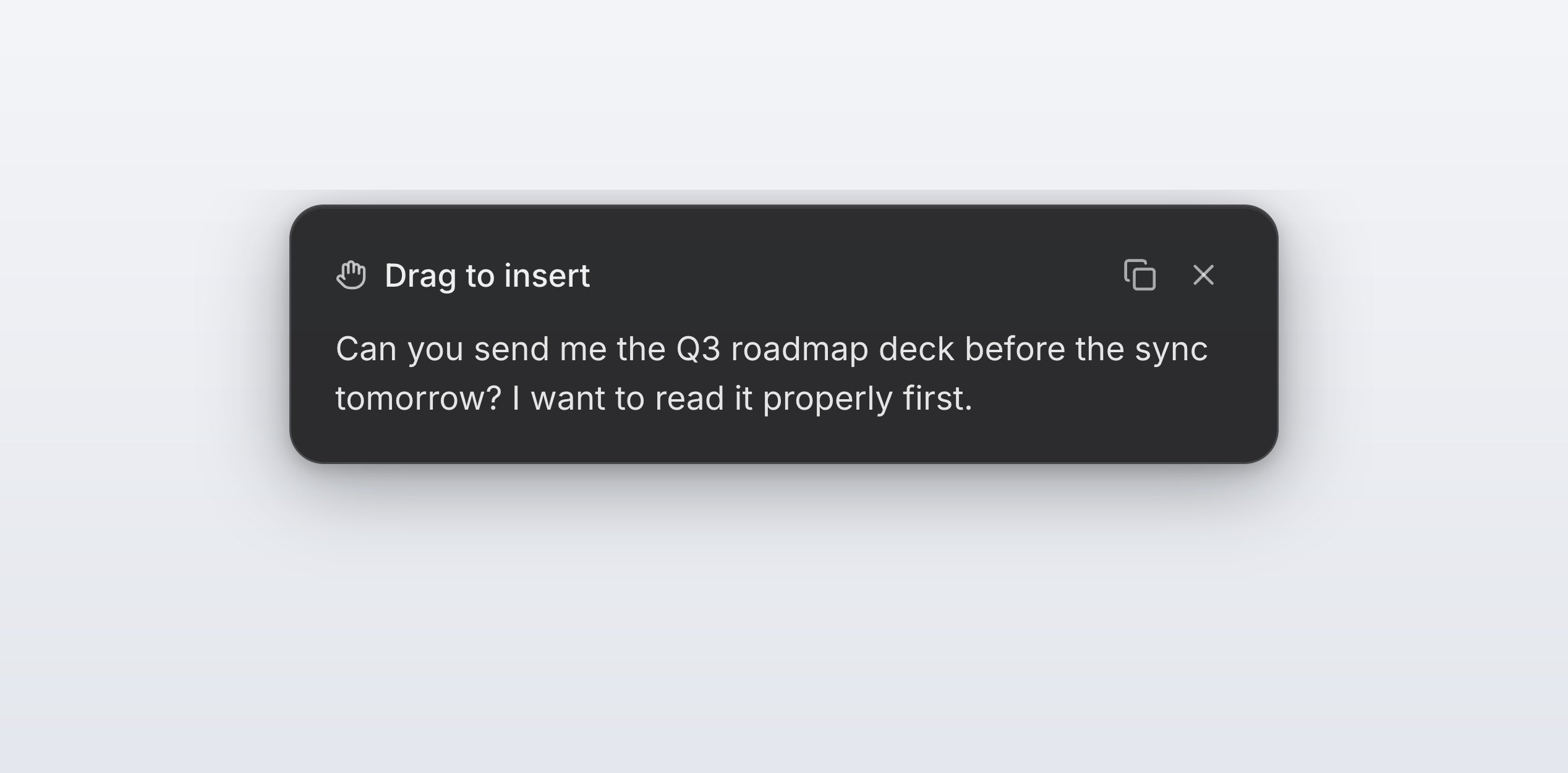
The insertion fallback card. This is Vowen showing you the text rather than pasting it into nothing.
- Accessibility permission is not granted. The card then also says “Grant Accessibility permission so Vowen can insert text for you.”
- Something is focused, but it is not a text field you can type into. A Finder list, a web page with no input focused, a static view.
Stuck on “Listening” and I cannot stop the recording (macOS)
Symptoms: The indicator says it is listening, releasing the shortcut does nothing, and pressing it again does nothing either. Cause: macOS can stop delivering keyboard events to Vowen when the machine is under heavy load. If that happens mid-dictation, the key release that would have stopped your recording never arrives. This recovers on its own. After 15 seconds without a release, Vowen ends the recording anyway and transcribes what it captured. You get your text without restarting. What you will see: the indicator stays up for up to 15 seconds longer than you expect, then the dictation completes normally. If it happens repeatedly: it is a sign of sustained CPU pressure. Check Activity Monitor for whatever is saturating the machine, and see Performance.Every shortcut stopped working at once (macOS)
Symptoms: Not one shortcut, all of them. Dictation, Command Mode, hands-free, the meeting panel. All dead simultaneously. Cause: The same loss of keyboard events described above. When it happens while nothing is recording, every shortcut goes with it. This recovers on its own, within a few seconds. Any modifier keys Vowen thought were still held are cleared at the same time, so a half-held chord cannot survive the outage and make a bare letter key fire a shortcut afterwards. You do not need to restart Vowen. If shortcuts are still dead after a few seconds, it is a different problem. See Shortcut Problems.Windows: blank window or dead shortcuts after sleep
Symptoms: After waking the machine, the Vowen window is blank or black, or the recording indicator’s buttons are visible but unclickable, or shortcuts do nothing. Cause: A Windows sleep cycle can leave the app’s window blank, leave the floating indicator drawn but unclickable, and quietly stop keyboard shortcuts from being delivered, all without any error. This is repaired automatically on wake, including clearing any modifier keys left stuck down. If a recording is in progress when you wake, Vowen waits for it to finish rather than cutting you off mid-sentence. If it persists: give it a couple of seconds after wake, then, if still broken, fully quit and relaunch.The app interface looks too large
Symptoms: The installed app’s UI looks noticeably bigger than it should, with cramped or clipped layouts. Cause: An older version rendered some windows around 11% larger than intended. Current versions set the right size on every window. Fix: Make sure you are on the current version. If a window still looks wrong, press Cmd/Ctrl + 0 to reset it, or close and reopen that window.Zoom does not stay where I put it
Symptoms: You zoom in with Cmd/Ctrl + =, and it resets the next time the window loads. Cause: Zoom is intentionally not persisted. Vowen has no zoom setting, and each window returns to its intended size every time it opens, including after a restart. There is no way to make a manual zoom stick. Use your operating system’s display scaling if you need the whole interface permanently larger.A model I was using disappeared
Symptoms: A banner appears saying “[model] has been removed”, and dictation will not run. Cause: A speech model was retired from the catalog, but your settings still point at it. Vowen does not reassign your model for you. It detects the dangling selection and tells you once. Fix: Click Choose a model on the banner and pick a replacement. Vowen checks every place a model can be stored, so also check the model set on any Tone you use, which overrides your global choice at recording time.GigaAM v3, the on-device Russian model, has been retired. If that was your model, pick a multilingual replacement from the Speech models page.
Dictations are piling up in my clipboard manager
Symptoms: Every dictation shows up in Maccy, Raycast, Alfred or Ditto.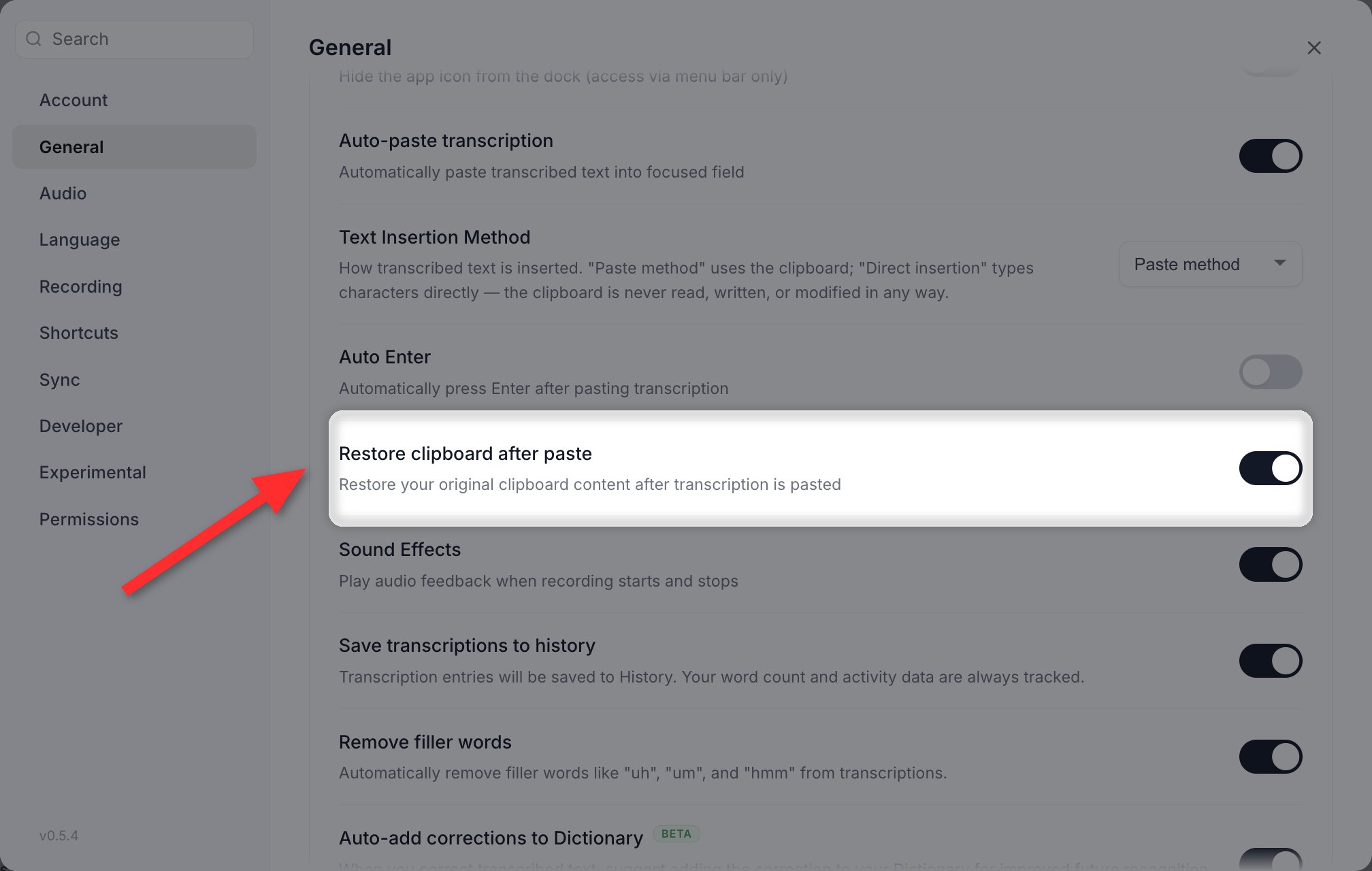
Restore clipboard after paste, in Settings > General. Direct insertion avoids the clipboard altogether.
Flaky connections, timeouts or “network error” on cloud services
Symptoms: Cloud transcription or AI calls fail intermittently, or fail instantly with a network error, particularly on a network where other apps seem fine. Cause: Networks that advertise IPv6 but cannot actually route it. The connection attempt hangs or fails before a working IPv4 address is tried. Fix: Settings > Developer > Prefer IPv4 Connections. It is on by default and connects over IPv4 before trying IPv6. If it has been turned off, turn it back on. It applies immediately, with no restart.Only turn this off if you are on a genuinely IPv6-only network.
”Local Whisper server is not running”
Symptoms: A banner reading “Local Whisper server is not running” with a Restart Server button that does not help. Fixes:- Delete the model and re-download it from the Speech models page in the sidebar
- Check that antivirus has not quarantined the model file or the Whisper binary
- Try a different model to isolate whether it is the model or the server
- On Windows, install the Visual C++ Redistributable
- If the banner instead says the model was not found, use its button to pick a model
”Thank you” appears in the output
Symptoms: The transcription reads “Thank you.” even though you said nothing of the kind.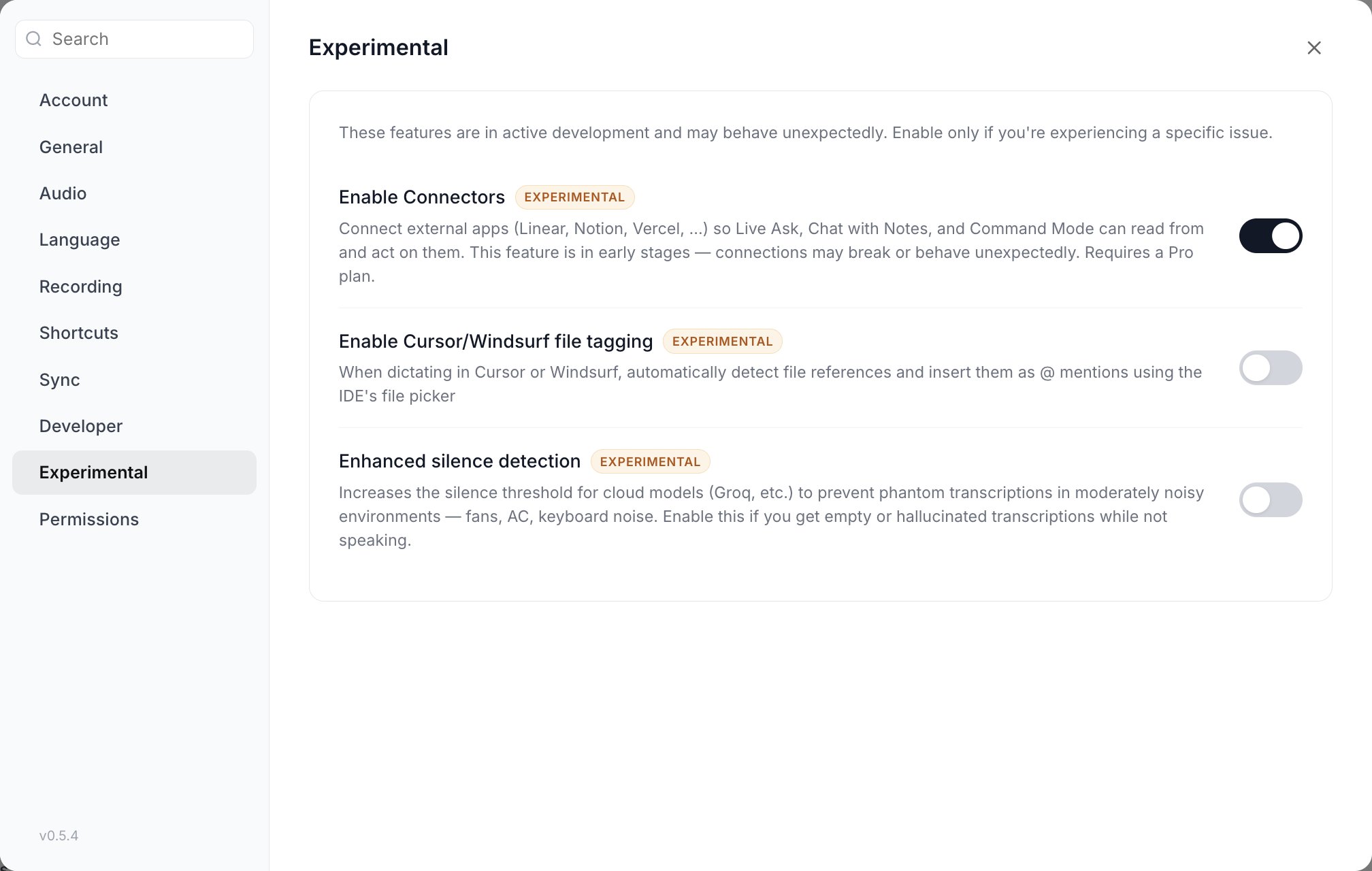
Enhanced silence detection, in Settings > Experimental. It raises the silence threshold for cloud models.
- Start speaking as soon as you press the shortcut rather than holding it in silence first
- Vowen already discards this automatically when the whole transcription is nothing but that phrase, on the local models. If one still reaches your app, there was other text around it, so include the surrounding words when you report it.
- Turn on Settings > Experimental > Enhanced silence detection. It raises the silence threshold for cloud models to stop phantom transcriptions in rooms with fans, air conditioning or keyboard noise. A Sensitivity slider from 1 to 5 appears once it is on, defaulting to 2.
Enhanced silence detection is in Settings > Experimental, not Settings > Recording.
First or last word cut off
Symptoms: The start or end of what you said is missing. Cause: Vowen conditions the audio before sending it to the model, and the transform it applies depends on the engine.
That third bucket is why the last word stopped going missing on Groq, ElevenLabs and Mistral. Those providers were inheriting Whisper’s trim by accident.
If it still happens: hold the shortcut for a moment after you finish speaking, and use Retry from the Voice Log entry. Retry always re-reads the original recording, never the conditioned audio, so it will show you whether the audio or the model lost the word.
Recording indicator not showing
Symptoms: You hear the recording sound but see no indicator.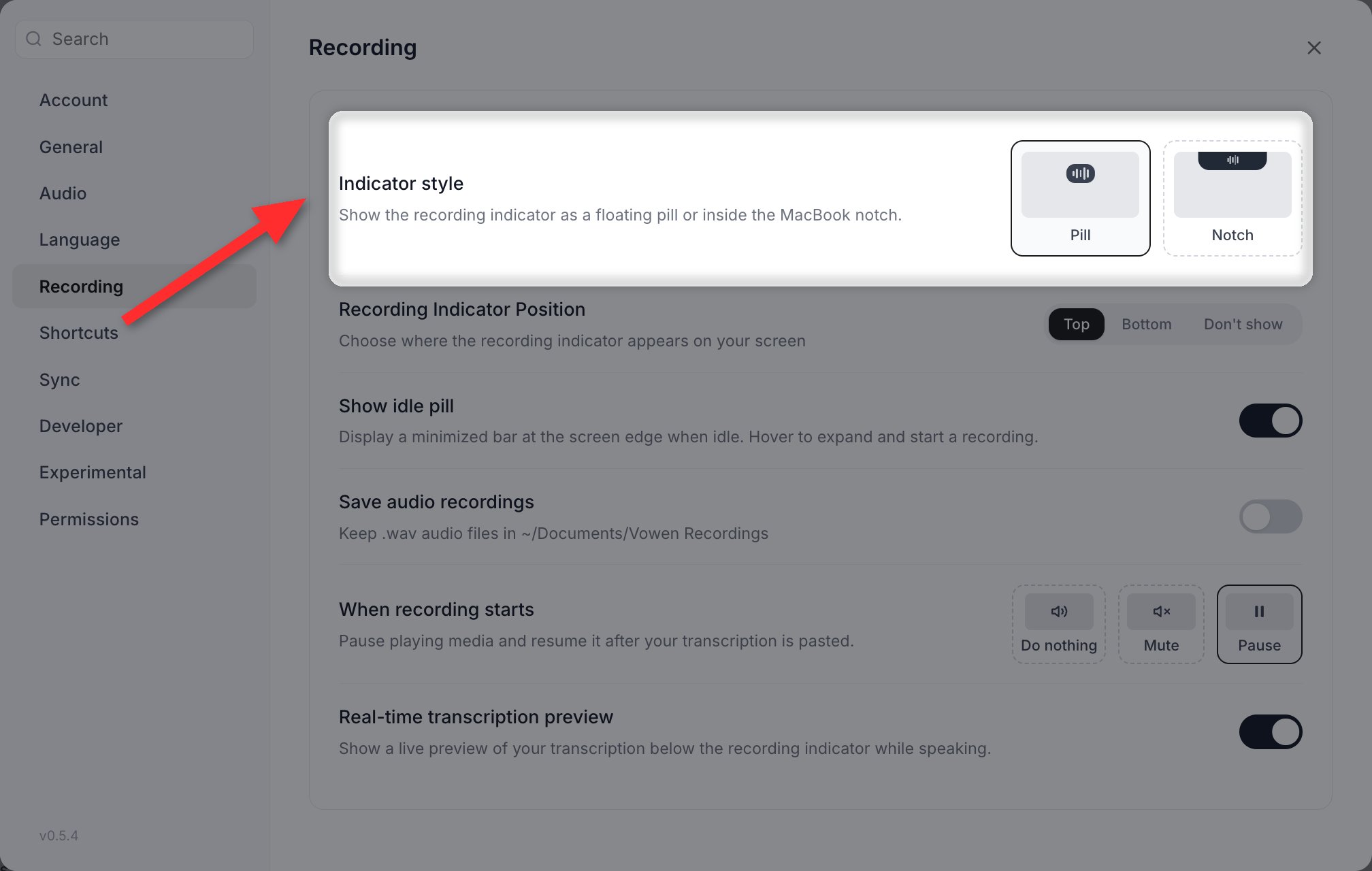
Indicator style and position both live in Settings > Recording. Position has a Don't show option that hides it entirely.
- Check Settings > Recording > Recording Indicator Position. The options are Top, Bottom and Don’t show, and it defaults to Top. If it is set to Don’t show, that is your answer.
- On macOS, check Indicator style in the same section. Notch renders in the notch area rather than as a floating pill.
- The indicator may be on another monitor. Check all screens.
- Restart Vowen.
Recording Indicator Position is in Settings > Recording, not Settings > General.
App running slow or using a lot of memory
Fixes:- Switch to a smaller model, or to a cloud model so nothing stays resident locally
- Turn on Settings > General > Resource efficient mode, which loads the model only when it is needed
Model download fails
Symptoms: The download fails with “self signed certificate in certificate chain” or a similar certificate error, usually on a work machine. Cause: Corporate networks with SSL inspection (Netskope, Zscaler and similar) replace certificates on secure connections, and the in-app downloader rejects the substituted certificate. Fixes:- Download the model in your browser and place it in Vowen’s models folder. See Manual Model Installation.
- Ask your network administrator to exempt
huggingface.coandassets.vowen.aifrom SSL inspection, not just to allow them. - As a quick test, try downloading over a personal hotspot.
Cloud model not working
Symptoms: A cloud model is selected but nothing comes back. Fixes:- Check your internet connection, and turn on Settings > Developer > Prefer IPv4 Connections if it is off
- Re-enter your API key on the Speech models page in the sidebar
- Check the provider’s status page
- Check your usage. Free tiers hit rate limits quickly.
- Fully quit and relaunch Vowen
Still stuck?
- Join the Discord community for help from the team and other users
- Work through the specific troubleshooting pages in the sidebar for deeper guides