
Shortcut not working at all
1
Check permissions (macOS)
Accessibility permission is required for global shortcuts. Go to System Settings > Privacy & Security > Accessibility and make sure Vowen is enabled. If it is already listed, remove it and re-add it rather than toggling it. See Permissions Problems.
2
Restart Vowen
Fully quit (right-click the tray or menu bar icon, then Quit) and relaunch. A restart is required after granting Accessibility permission.
3
Check for conflicts
Close other voice-to-text apps that may have claimed the same keys. Also check System Settings > Keyboard > Keyboard Shortcuts on macOS for a system binding on the same combination.
4
Re-record the shortcut
Go to Settings > Shortcuts, click the shortcut field, and press your combination again.
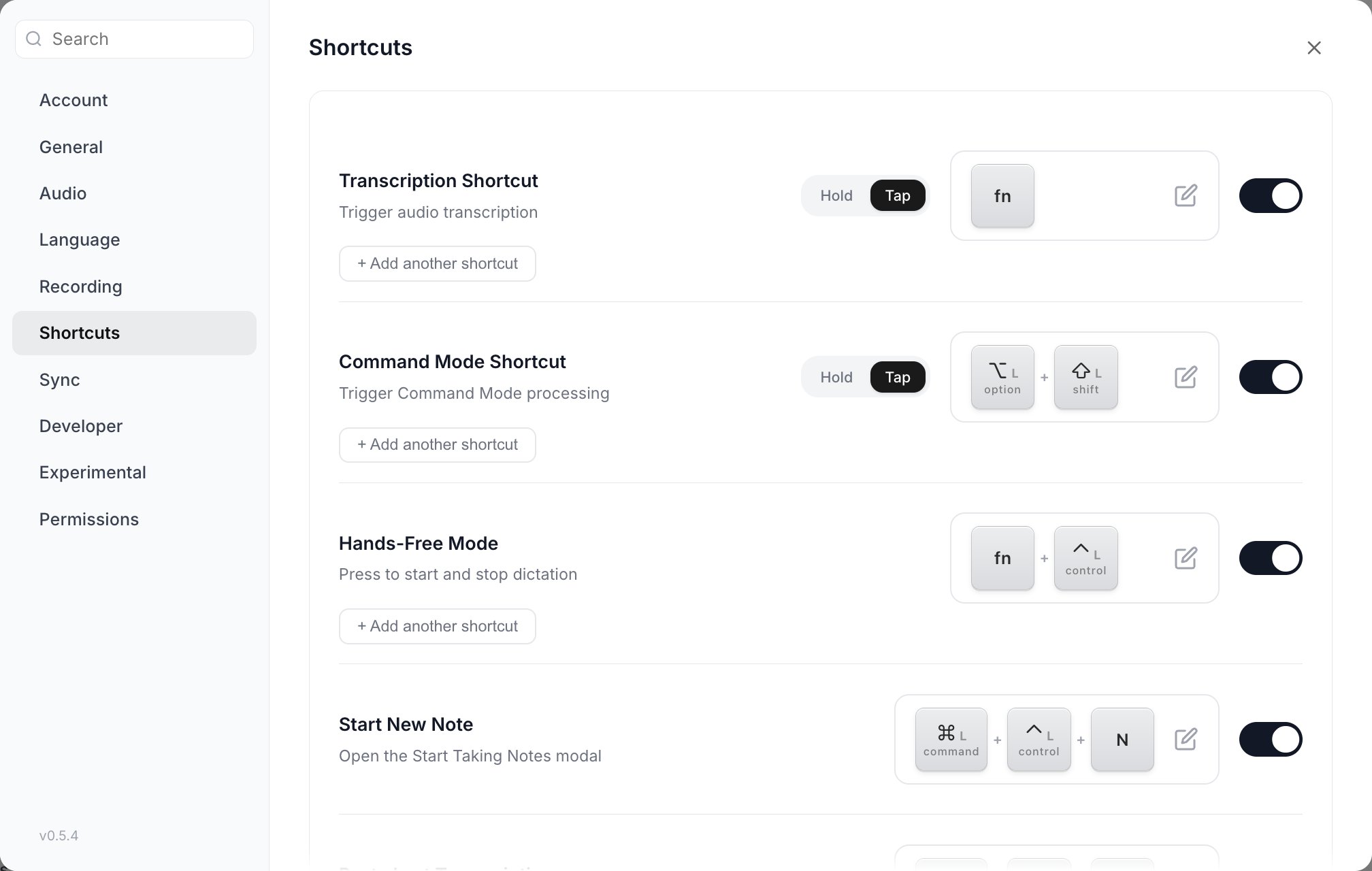
Settings > Shortcuts. Each row has its own on/off toggle at the right, and a disabled row looks much like an enabled one.
If it is specifically the Command Mode shortcut that does nothing, this is almost always not a shortcut problem. Command Mode has a master switch that is off by default, and pressing the shortcut while it is off produces no feedback at all. See Nothing happens when I press the Command Mode shortcut.
Every shortcut died at once (macOS)
Symptoms: All shortcuts stop working simultaneously. Dictation, Command Mode, hands-free, the meeting panel. Cause: Under sustained load, macOS cuts Vowen off from your keyboard. Every shortcut stops at the same moment. This self-recovers without a restart. Two mechanisms cover it:- Vowen’s key server re-enables the tap in place the moment macOS disables it, with no process respawn. It also retracts any modifier state it synthesized during the outage, because events dropped while the tap was off are most likely to be a chord’s key-up. Physical modifiers you are actually holding are left alone, so a dictation in progress is not cut off.
- A health check runs every 5 seconds and verifies the key server is genuinely alive: the process itself, and both of its pipes, not just its own status flag. Any failure triggers a restart of the hook.
A recording will not stop (macOS)
If the tap dies mid-dictation, the key-up that would have ended your recording is lost, and a hold-to-record session has no other way to finish. Vowen watches for the release on a second, independent input tap that is unaffected by the first one dying. If no release arrives within 15 seconds, it finalizes the recording and transcribes what it captured. You keep your text. The only cost is that the indicator stays up for up to 15 seconds longer than you expect.Windows: shortcuts dead after sleep
Symptoms: After waking the machine, no shortcut does anything. No error, no indication that something is wrong. Cause: The low-level Windows keyboard hook stays alive in-process while the OS quietly stops delivering events to it. There is no error and no liveness signal to probe from the app. Locking the screen has a related effect: key-ups delivered to the secure desktop are never seen, leaving modifier flags stuck true so a later bare keypress can false-fire a combination. This is repaired automatically on wake. Vowen clears stale key state immediately, then reinstalls the hook after a short settle delay. If a recording is active when the timer fires, the restart is deferred rather than killing the recording. Theresume and unlock-screen events are coalesced so the hook is only torn down once.
What to do: wait a couple of seconds after waking. If shortcuts are still dead, fully quit and relaunch.
See also Windows: blank window or dead shortcuts after sleep.
Platform-specific issues
macOS: Fn key not registering after install
The Fn key sometimes does not register immediately after a fresh install or after granting permissions. Fix: fully quit and relaunch Vowen. If it still does not work, restart your Mac.Windows: modifier key names
macOS documentation uses Option and Command. On Windows:- Option is Alt
- Command is the Windows key
Mouse button shortcuts
Vowen supports six bindable mouse buttons:
Left and right click are deliberately not bindable, since binding them would swallow ordinary clicking.
M6 through M8 only ever fire on macOS. Windows and X11 collapse extra mouse buttons into M4 and M5, so a 12-button mouse will report at most M4 and M5 there regardless of what its own driver software shows.
Browser navigation still fires when using Back or Forward
This is a real limitation, not a bug you can configure away. Vowen listens for mouse buttons but cannot suppress them. The swallow mechanism only exists for keyboard events on macOS, and mouse-only bindings cannot be represented as a system shortcut that would consume the press. What to do: bind Middle, or M6 through M8 on macOS, instead of Back and Forward. Alternatively remap the physical button in your mouse’s own driver software to something Vowen can bind cleanly.Mouse button behavior
- Mouse-bound shortcuts follow the same Hold and Tap modes as keyboard shortcuts. In the default Hold mode the button is push-to-talk and recording stops when you release it. Set the shortcut to Tap if you want the first click to start and the next one to stop.
- There is a 300 ms minimum-hold guard, because M4 and M5 on macOS fire duplicate press events within a single physical click.
- On Windows there is a short cooldown after release, to absorb the synthetic middle-click that ending auto-scroll produces.
Hold vs Tap mode
Dictation and Command Mode shortcuts each have a Hold / Tap pill in Settings > Shortcuts: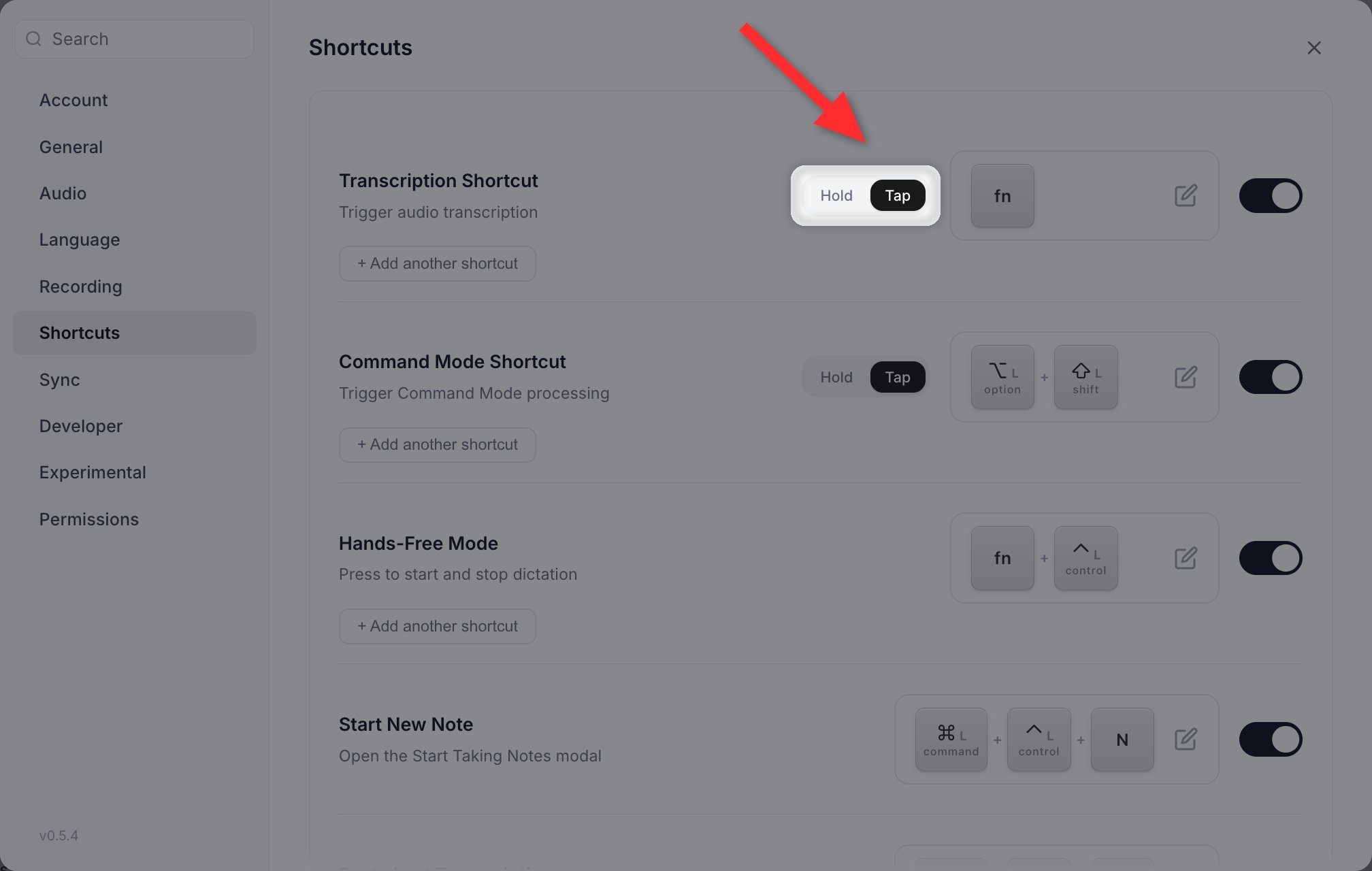
The Hold and Tap pill sits between the action name and its keys.
- Hold is push-to-talk. Release to stop. This is the default.
- Tap starts on one press and stops on the next.
Cancelling a recording
Escape is a real, rebindable shortcut, and it is enabled by default on both platforms.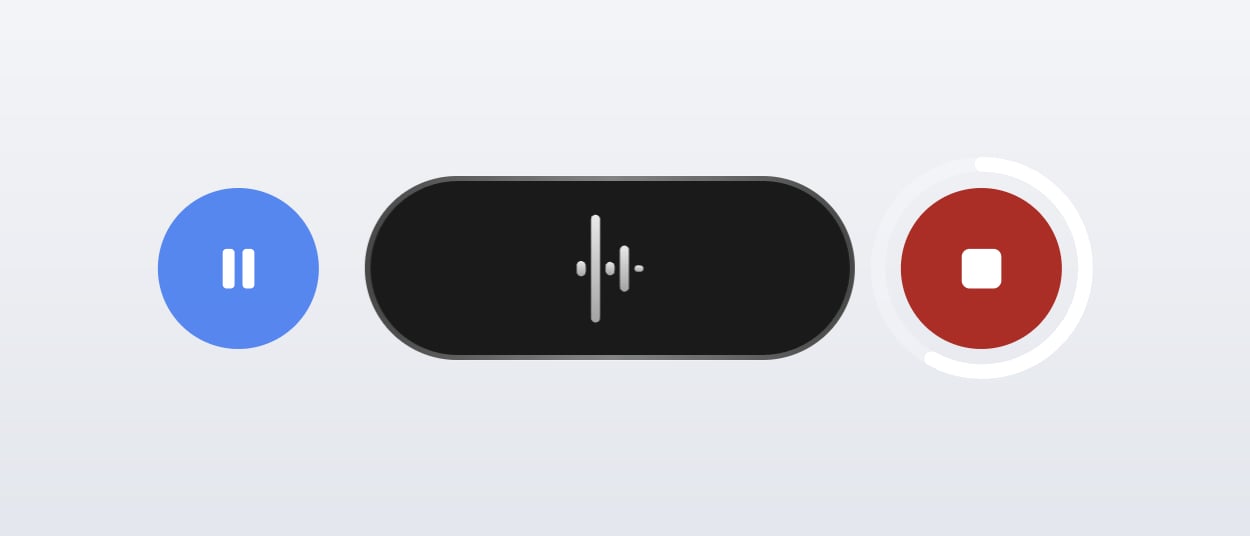
Holding stop fills a ring around it. When the ring completes the recording is discarded.
Keyboard layout issues
Non-QWERTY layouts
Vowen matches letter shortcuts by physical key position, not by the character printed on the key. A shortcut recorded as Control + A on QWERTY fires on the physically equivalent key on AZERTY, which types Q there. Keycaps are translated for display. The shortcut fields and keycap chips throughout the app are redrawn using your active keyboard layout, and they update live when you switch layout, so what you see matches what you press.If you have been using Vowen since before this landed, you may see a one-time “Some shortcuts may need to be updated” modal on a non-QWERTY layout. It lists your current shortcuts (Dictate, Command mode, Hands-free, Start meeting notes, Paste last transcription, Cancel recording) so you can check they are what you expect. Looks good dismisses it; Something’s off takes you straight to Shortcuts settings. It appears once and never again.
The ISO 102nd key
The extra key that ISO keyboards have and ANSI keyboards do not (left of1 on Mac layouts, next to left Shift on PC layouts, printed as §, < or º depending on layout) is bindable. Vowen stores it positionally rather than as whatever character your layout produces.
Punctuation keys
Punctuation shortcuts behave differently by platform:- macOS and Linux: matched by physical position and displayed with your layout’s glyph. A shortcut recorded as Control +
/on QWERTY fires at the same physical key on AZERTY, which types:there, and the keycap shows:. - Windows: punctuation is matched by whatever the layout assigns and is not position-corrected, and the keycap shows the US character. If a punctuation shortcut behaves unexpectedly on a non-US Windows layout, re-record it on that layout.
Windows: accented characters stopped working
Symptoms: On a Spanish, French, Portuguese, German or Czech layout, dead keys intermittently fail. You press an accent, then a vowel, and get the bare vowel roughly every other time. Cause: Vowen reads your layout to translate keycaps for display, and the Windows API for doing that mutates the kernel’s keyboard buffer, which is exactly where a pending dead key lives mid-composition. A periodic re-read was flushing primed accents about once every two seconds. Fix: Update to the current version, which re-reads the layout only when the active layout changes. Changing your shortcuts will not help, since the keyboard hook was never involved.Specific scenarios
Shortcut works in some apps but not others
Shortcut works in some apps but not others
Some apps intercept certain combinations before Vowen sees them:
- F7 in browsers triggers Caret Browsing
- Ctrl+Shift in terminals is often bound to copy and paste
- Remote desktop apps consume shortcuts wholesale
Shortcut fires but recording does not start
Shortcut fires but recording does not start
Check that:
- Your microphone is connected and working
- The right input device is selected in Settings > Audio
- No other app has exclusive control of the device
- On Windows, microphone access is allowed in Windows Settings > Privacy & security > Microphone. Vowen cannot detect a Windows-level microphone block and will report the permission as granted regardless.
A bare letter key fires a whole chord
A bare letter key fires a whole chord
If you use an accessibility keyboard, Sticky Keys, or automation software that posts keystrokes, something upstream can assert modifier flags you are not holding. Vowen detects keydowns carrying modifier flags that no modifier event ever announced and logs a warning rather than firing the chord.If a bare letter key is still firing a modified shortcut, make sure you are on the current version and check for latched modifiers on the accessibility keyboard.
Different shortcuts with and without AI enhancement
Different shortcuts with and without AI enhancement
Configure alternative shortcuts in Settings > Shortcuts. Each alternative shortcut carries its own AI enhancement setting with three values: Global (follow the global setting, and the default), Always, and Never.The primary shortcut has no AI control of its own. It always follows the global setting.
Which keys can I actually bind?
Which keys can I actually bind?
Letters, digits, F1 through F24, all punctuation, the arrow keys, Home, End, Page Up, Page Down, Insert, Space, Tab, Enter, Backspace, Delete, and the ISO 102nd key. Escape is bindable only on the Cancel Recording row.
Related pages
Shortcuts
Every shortcut Vowen ships and how to configure them.
Permissions problems
The most common reason a shortcut never fires on macOS.