
The Free plan includes 1 Tone, so you can build a real one before upgrading. Pro removes the cap.
API key required for the AI parts. A Tone with AI Enhancement on needs a Language Model connected. Set one up under Configure your AI. A Tone that only switches the speech model or dictation language works without any provider.
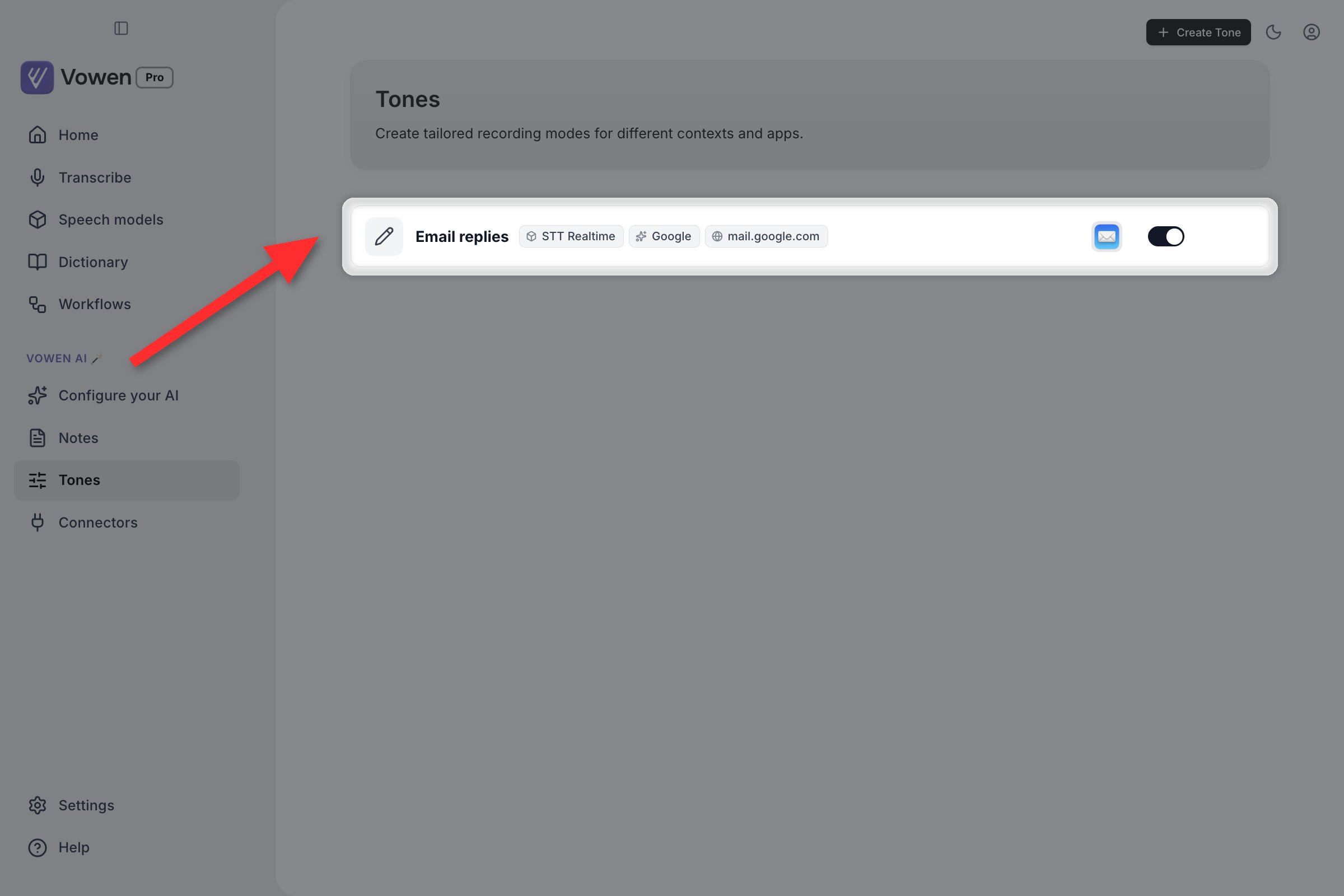
Each tone card shows what activates it: its speech and AI models, and any website it matches.
How a Tone is chosen
When you start dictating, Vowen resolves exactly one Tone, in this order:1
A bound shortcut wins outright
If you started the recording with a Tone’s own shortcut, Vowen uses that Tone regardless of what app is focused.
2
Website rules
If a browser is frontmost and its URL matches a Tone’s website list, that Tone wins. A website rule deliberately beats an app rule. The page you’re on says far more about what you’re writing than “some window of Chrome is focused” does.
3
App rules
Otherwise, the first enabled Tone whose app list contains the focused app.
4
Global settings
No match, no Tone. Your global speech model, language, enhancement toggle and custom instructions apply.
A Tone that is switched off is skipped entirely at every step. Disabling behaves exactly like deleting it, minus losing the configuration.
Creating a Tone
1
Open Tones
Sidebar > Vowen AI > Tones.
2
Create a new Tone
Click the create button. The editor opens as a single scrolling dialog with four labeled sections.
3
Fill in the four sections
See below. Only Icon & Name is required.
4
Save
A shortcut that collides with another Tone or a built-in shortcut blocks saving outright, with the conflict named.
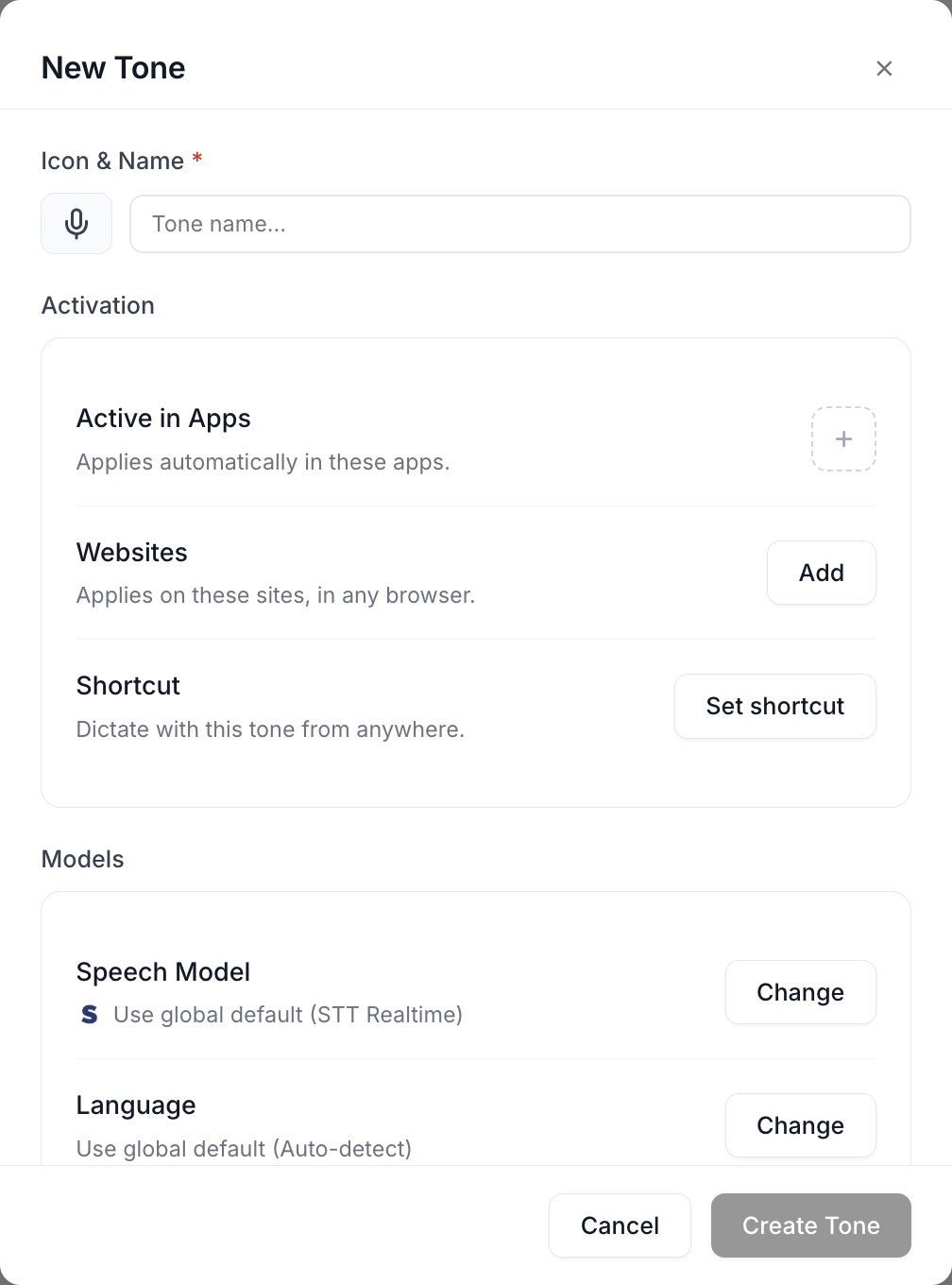
A new tone: what activates it, the models it uses, and the instructions it adds.
The four sections
Icon & Name
Icon & Name
Pick an icon and type a name. The name is what the Tones list shows, what the recording pill shows while the Tone is active, and what a conflict warning names.
Activation: when this Tone applies
Activation: when this Tone applies
- Active in Apps: pick apps from a searchable list of what’s installed. The Tone applies whenever one of them is focused.
- Websites: see Website rules below.
- Shortcut: bind a key (or mouse button) that forces this Tone. Choose hold or tap-to-toggle, the same choice the global shortcuts offer. A clear button removes the binding.
Models: what runs while this Tone is active
Models: what runs while this Tone is active
- Speech Model: the transcription model to use. Defaults to “use global default”, with the current global named so you can see what you’re overriding.
- Language: the spoken language for this Tone’s recordings. Also defaults to the global.
- AI Enhancement: on or off for this Tone. Disabled until an AI provider is connected.
- Language Model: which configured provider and model enhances this Tone’s dictation. Only appears once AI Enhancement is on.
Instructions: how it writes
Instructions: how it writes
A free-text area of style directives sent to the AI while this Tone is active, with a live character count. It is disabled unless AI Enhancement is on for the Tone, and the editor says so rather than letting you type into a field that will be ignored.
Website rules
A Tone can list websites the way it lists apps, so a “Formal email” Tone can fire onmail.google.com without also firing on every other tab in the same browser.
Website rules work on macOS and Windows. Linux has no browser URL reading, and the tone editor says so if you add one there.
Scheme,
www., ports, query strings and fragments are ignored on both sides. Path matching is segment-aware, so /vowen-ai matches /vowen-ai/repo but never /vowen-ai-labs.
Installed web apps and PWAs
On macOS, a site you have installed as its own app still matches your website rules. That covers Chromium’s “Install this site as an app” and Safari’s “Add to Dock”. Those installs get a freshly minted bundle identifier per install, so no app list could ever name them, but Vowen recognizes the shape and reads the URL exactly as it would in a tab.Per-Tone shortcuts
Binding a shortcut to a Tone gives you a dictation key that carries a whole profile. The Tone applies from anywhere, whatever app is focused. Press your “Technical” key inside your mail client and you get the technical Tone, app rules ignored.- Hold or tap-to-toggle, chosen per Tone
- Mouse buttons can be bound as well as keys
- Conflicts with another Tone or a built-in shortcut are detected before you save, and the conflicting owner is named
- A Tone whose shortcut fires while it is disabled falls back to global settings rather than applying silently
Switching Tones by hand
Two surfaces let you override matching without opening settings:- The idle pill carries a tone chip showing which Tone the next dictation would use. Open it and pick any Tone to pin it, or Automatic to hand control back to app and website matching. Pinning is sticky rather than one-shot, and the chip shows the pinned Tone with a visible marker so it can’t linger unnoticed.
- The native notch bar (macOS) shows the same thing as a glyph with a dropdown: Automatic with the currently resolved Tone as its subtitle, then every Tone, then Manage tones.
Example setups
Personal finance email



You speak
Hey so I noticed there’s this random thirty seven dollar charge on my card from like two days ago that I don’t remember making, can you guys look into this and let me know what it is, and if it was a mistake can you reverse it? Thanks
It sends
Hi,
I noticed a $37 charge on my card from two days ago that I don’t recognize. Could you confirm what this charge is for? If it was made in error, I’d like to request a reversal.
Thanks,
I noticed a $37 charge on my card from two days ago that I don’t recognize. Could you confirm what this charge is for? If it was made in error, I’d like to request a reversal.
Thanks,
Casual chat


You speak
Hi team, I just wanted to let everyone know that I have finished the quarterly report and it is now ready for review whenever you have a moment to look at it.
It posts
q report’s done, take a look when you can
Talking to AI coding agents


You speak
So basically I want the card on the left to take up all the rest of the room going across, and then inside it the buttons should be stacked on top of each other with some spacing between them, not crammed together.
It sends to your agent
Make the left card
flex-1. Inside it, set the button container to flex flex-col gap-3.Brain-dump to structured notes


You speak
Okay so for the launch next month we need to finalize the pricing tiers, talk to legal about the terms update, the marketing team needs the screenshots by Friday, oh and we should test the onboarding flow one more time, also I want to add analytics events to track the new buttons, and let’s get a list of beta users to email.
It writes
Launch checklist
• Finalize pricing tiers
• Loop in legal for terms update
• Send marketing team screenshots by Friday
• Re-test onboarding flow
• Add analytics events on new buttons
• Compile beta user list for email
• Finalize pricing tiers
• Loop in legal for terms update
• Send marketing team screenshots by Friday
• Re-test onboarding flow
• Add analytics events on new buttons
• Compile beta user list for email
How Tone instructions combine with global ones
A Tone’s instructions do not replace your global ones. When a Tone with AI Enhancement is active, the Tone’s instructions come first and your global Custom Instructions (Configure your AI > Configuration) follow, and the whole thing is sent as a single high-priority directive that overrides the base cleanup rules where they conflict. Keep permanent, universal rules global (spellings, name corrections, date formats) and keep the situational voice in the Tone. See Custom Instructions for how to phrase them.Per-Tone models
Each Tone carries its own model choices, so you can spend where it counts:- Speech model: pair higher accuracy with an email Tone, lower latency with a chat Tone.
- Language: a Tone for a language you only write in one app, without switching your global setting.
- AI model: a stronger model for long-form writing, the cheapest tier for quick messages.
A Tone with AI Enhancement off still applies its speech model and language. Turning enhancement off does not turn the whole Tone off. It only means nothing is sent to an AI provider for that dictation.
Set up an AI provider
Tones with AI Enhancement on require a configured Language Model. Connect Groq, OpenAI, Anthropic, Gemini, or any of 10 supported providers.