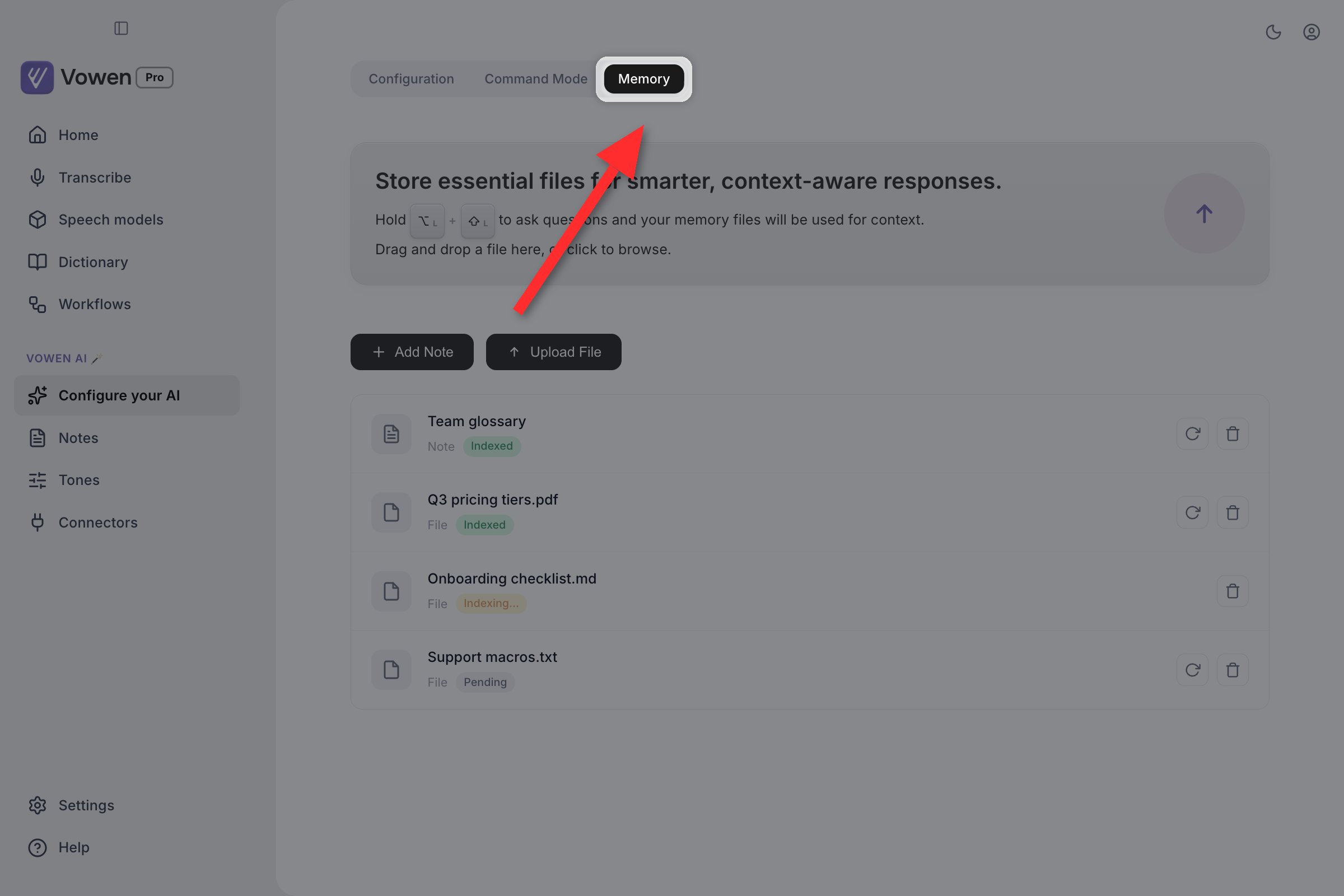
Memory is a small collection of notes and files that Vowen reads once, indexes, and then supplies as background context every time you use Command Mode. It exists so you stop dictating the same facts about yourself over and over.
Memory is a tab on the Configure your AI page in the left sidebar. That page has three tabs, in order: Configuration, Command Mode, Memory.There is no Memory section in the Settings modal.
Memory is locked until you connect an AI provider. Open the tab without one and you get a lock card with a Connect an AI provider button instead of the Memory list. The lock is not only a UI gate. Indexing an item requires a model call, so nothing can be stored usefully until a provider is configured. Set one up on the Configuration tab first.
Memory is the third tab of Configure your AI. Notes and files sit in one list.
If you want a fact to shape how your dictations are cleaned up, put it in Custom AI Instructions or a Tone, not in Memory.
Custom Utilities carry one further exception. A utility built on the “polish text” template is treated as a transcription enhancer and gets no Memory context. Utilities built on the other templates, or on a custom prompt, do.
Memory also holds files. Drag one onto the banner at the top of the tab, click the banner to browse, or use the Upload File button. One file at a time.The file picker offers .txt, .md, .pdf, .docx, .json, .csv, .xml, .html and .htm.How a file is read depends on its type:
Plain-text formats (.txt, .md, .json, .csv, .xml, .html, .htm) are read directly from disk.
Documents (.pdf, .docx) are handed to your AI provider’s document API. This path works on Gemini and Anthropic only, and Anthropic accepts PDF but not DOCX. If your provider cannot process documents, the item finishes in the Error state and tells you to switch providers for indexing.
Files are copied into Vowen’s own storage when you add them, so moving or deleting the original afterwards does not break the memory item.
Adding an item does not store the raw text for later. Vowen sends the content to your AI provider once and asks it to extract the durable facts: personal and professional details, dates, numbers, key facts, preferences and requirements. That summary is what gets injected later, never the original document.Each item shows its state in the list:
Status
Meaning
Pending
Added, not yet indexed
Indexing…
The model call is in flight
Indexed
Ready. This item will be supplied as context
Error
Indexing failed. Common causes are a missing or invalid API key, exhausted quota, a network failure, or a document type your provider cannot read
Only items in the Indexed state ever reach the AI. Items in any other state are silently ignored.
Each row shows whether it is a note or a file and how far indexing has got. Only Indexed items are ever supplied as context.
Each row has controls to Index this item (or Re-index this item once it has succeeded) and Delete this item. Re-indexing is how you recover an item that failed while your provider was misconfigured.Very long content is truncated before indexing, so a book-length PDF contributes only its opening portion.
The free plan is capped at 3 Memory items. Notes and files count towards the same total. Pro removes the cap.The counter beside the Upload File button shows where you are. If you were previously on Pro and have more than three items, the extras remain visible but carry a Locked badge and stop contributing context.
Custom Utilities are Pro-only, so on a free plan Memory effectively shapes Command Mode alone.
Memory is per device and is not covered by Cloud Sync. Notes and files you add on one machine will not appear on another, even with Cloud Sync enabled and working. Memory is also not part of Import & Export Data. If you move to a new machine, you have to add your Memory items again by hand.
Keep it short. There is no retrieval step. Every indexed item is sent on every Command Mode call, so an oversized Memory costs latency and tokens on requests that have nothing to do with it.
Prefer notes to documents where you can. A five-line note you wrote yourself indexes more precisely than a forty-page PDF that gets truncated.
Re-index after changing a file. Vowen indexed a copy at the moment you added it; editing the original changes nothing until you re-index.
Use descriptive names. The name is shown to the model alongside the summary.
Do not store live credentials. Passwords, API keys and card numbers belong in a password manager. Indexing sends content to your AI provider, and binary documents are uploaded to that provider in full.