
Ask AI requires the Pro plan, on both the transcription and meeting-note surfaces.
Ask AI ships on two surfaces and they behave differently. This page covers manual transcriptions, plus the concepts both surfaces share. For Ask AI on a meeting note, where it has its own tab, saved conversations, and the ability to rewrite the note, see Ask AI on meeting notes.
Overview
Ask AI lets you have a conversation about one transcript. Pull out action items, summarize a section, find a quote, or draft a follow-up, all in plain language. Ask AI only exists inside an individual item:- A completed manual transcription
- A completed meeting note
On a manual transcription
Open a completed transcription from the Transcribe tab. Ask AI is a floating panel docked at the bottom of the transcript reading column. There is no separate button to press. The panel is the prompt box, carrying the placeholder “Ask about the transcript…”. Type a question and press Enter. The panel expands into a full conversation view headed Chat with transcript, with a chevron to collapse it again. If you collapse a conversation that has messages, a small chip appears above the box showing the message count so you can reopen it.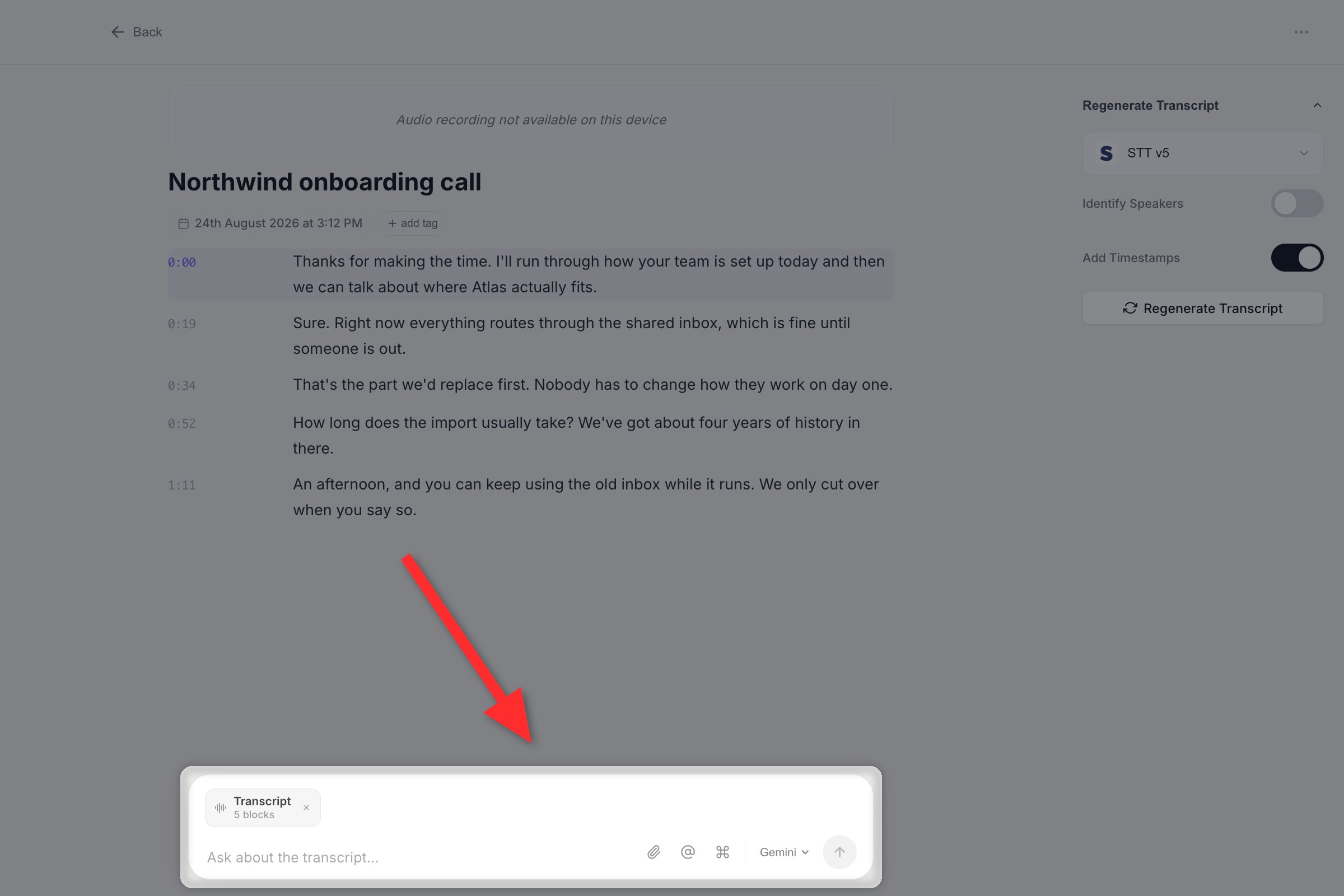
Ask AI is docked at the bottom of the transcript. The chip above the box shows what the question will be able to see.
The panel on this surface is labeled “Chat with transcript” in the app. On meeting notes the same feature appears as a tab named Ask AI. Both run the same conversation engine, with different amounts of surface around it.
Starter prompts
An empty conversation offers three one-click prompts under the heading “Ask anything”:- What decisions were made?
- List the action items
- Draft a follow-up email
/ in the box opens the full command menu, which adds Summarize the key points and What is still unresolved?, plus Clear chat.
What Ask AI can see
Click the@ button in the composer to choose what is attached to your question. It lists the context sources available on the current surface as toggleable cards.
On a manual transcription there is exactly one source:
That is the only card here, so the
@ menu reports “Nothing else to add” once it is attached. Meeting notes expose more sources, including the summary and your own notes.
Two more inputs apply on both surfaces:
- File attachments. The paperclip accepts a single image or PDF, up to 10 MB. Images are read by the model directly. Other file types are only announced to the model by name, not read.
- Connectors (Pro, experimental). When your question calls for it, Ask AI can look things up in your linked apps, for example a Linear issue or a Notion page.
Memory is not one of these sources. Memory reaches Command Mode and Custom Utilities only. Nothing you store there is visible to Ask AI.
Choosing a model
The composer has a model picker. You can switch which configured AI provider and model answers, per conversation, without leaving the page. See Configure your AI for setting providers up.Conversation history
A question about a one-off transcription is treated as throwaway. Conversations that persist across restarts, appear in a list, and can be renamed are a meeting-note feature. See Ask AI on meeting notes. The only history control on a transcription is the trash icon in the composer, or/clear, which empties the current conversation.
What Ask AI cannot do here
The assistant is read-only on a manual transcription. It answers questions and drafts text into the conversation, and it never edits the transcript itself. You can still edit the transcript by hand in the transcript editor. On a meeting note the assistant is given write access to the note’s title and summary, with an undo. That does not apply here, because a manual transcription has no summary to rewrite.Requirements
- An AI provider must be configured. Without one the panel shows “No AI provider configured. Set one up in Settings to chat.” Configure one on the Configure your AI page.
- Pro plan. On the Free plan the composer is replaced by an upgrade prompt reading “Chat with transcript is a Pro feature”.
Example questions
- “What were the action items from this?”
- “Summarize the key decisions”
- “Find the part where the timeline was discussed”
- “Who agreed to follow up on the budget question?”
- “Rewrite the second half as a status update for my manager”