
Import and Export Data require a paid plan. Pro unlocks them. On the free plan the buttons are replaced by an upgrade prompt.
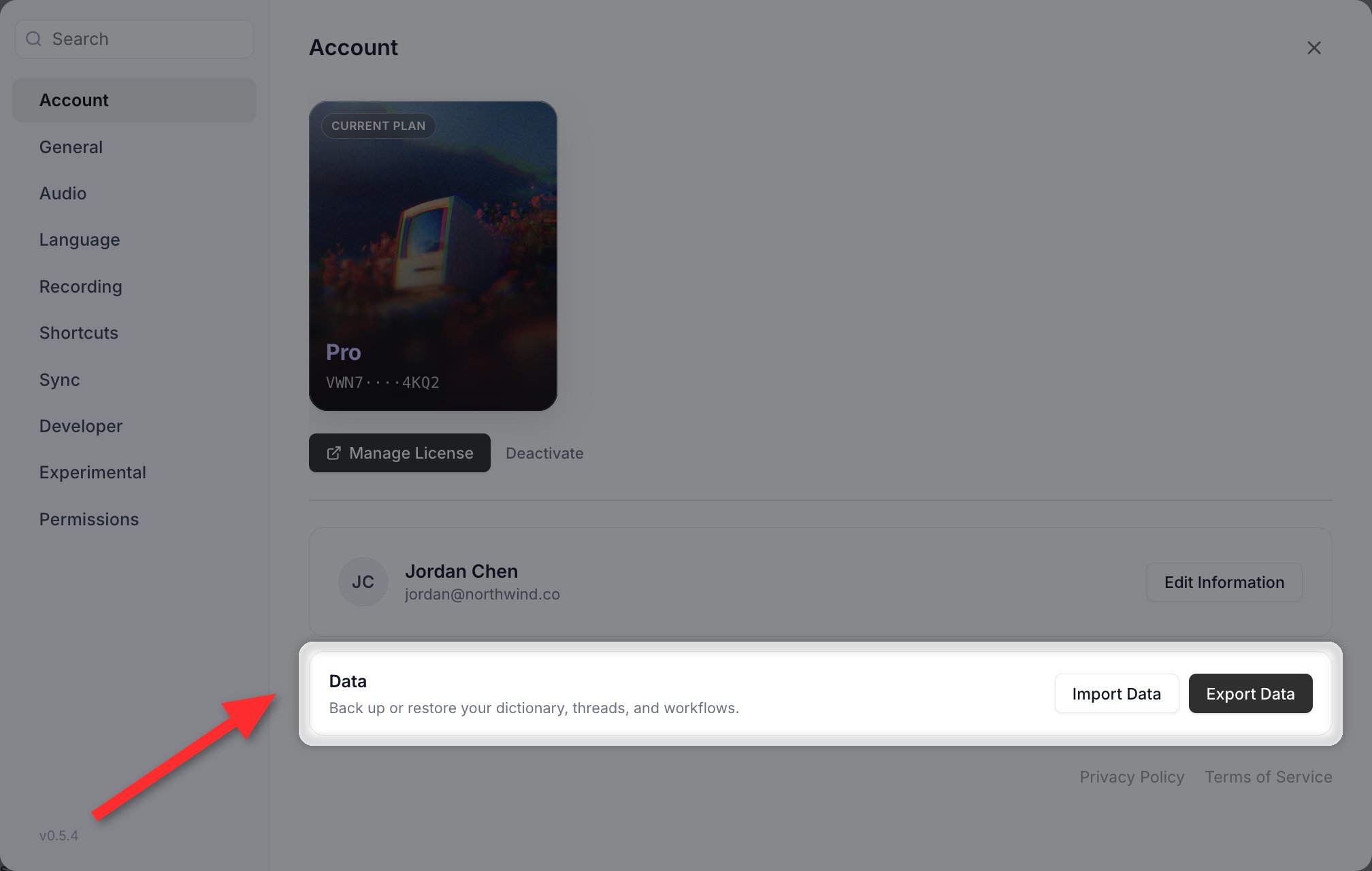
Import and Export live at the bottom of Settings > Account. One archive carries your Dictionary, Threads, expansions and voice shortcuts together.
Overview
Vowen stores your customisations in a single JSON file you can export, share, and re-import on another machine. The same file format is used whether you are:- Migrating from one computer to another
- Sharing a curated pack of expansions with your team
- Building a starter pack programmatically, for example by asking an LLM to generate one
This is a one-off file transfer, not an ongoing mirror. If you want your data kept in step automatically across machines, use Cloud Sync instead. Note that neither feature carries Memory items.
Where the buttons are
Import Data and Export Data are two buttons on a Data card at the bottom of Settings > Account. There is no Data section in the settings sidebar. The card is titled Data, subtitled “Back up or restore your dictionary, threads, and voice shortcuts”, and sits below your plan and profile cards.How to import
1
Open the Data card
Settings > Account, then scroll to the bottom.
2
Click Import Data
Drop your
.json file onto the dropzone, or click to browse.3
Review the preview
Vowen shows a count of each item type found in the file. The Import button stays disabled if the file contains nothing importable.
4
Click Import
Expansions and custom utility hotkeys go live immediately, with no restart.
How to export
1
Open the Data card
Settings > Account, then scroll to the bottom.
2
Click Export Data
Choose where to save the resulting
.json file. The default name is vowen-export-<date>.json.File format
An import file is a single JSON object.Top-level keys
Vowen’s own export always writes all nine keys, and including them all is the safest thing to do when hand-authoring a file. Only
_vowen, dictionary, threads and workflows are actually validated.
If any of dictionary, threads, or workflows is missing, the import is rejected with “This file doesn’t appear to be a Vowen export.”
Expansions (rich text supported)
Expansions are the most flexible item type and the only one alongside threads that supports rich text (bold, lists, links, headings, colors, highlights, alignment).Schema
Vowen’s own export writes every field, and including them all is recommended.
Shortcuts already present in your settings are skipped on import, matched exactly and case-sensitively. If you want to update an existing expansion, delete it first in the app, then re-import.
Per-expansion
variables arrays survive import and are still honoured. The global variable library is not part of the export file, so shared variable definitions do not transfer between machines. Expansions whose bodies reference {{tokens}} still import fine and will prompt for those values when used.Plain expansions
body and replacement are identical.
Rich-text expansions (HTML)
Whenformat is "html", the body is parsed as an HTML fragment by Vowen’s rich editor and the rich version is placed on the OS clipboard. Apps that read the rich slot (Gmail, Notion, Apple Mail, Slack rich compose, Word, Google Docs) receive the formatted version; apps that only read plain text (Terminal, code editors, <input> fields) get replacement.
Supported HTML
Vowen’s editor is built on Tiptap with the StarterKit, Link, TextStyle, Color, Highlight, and TextAlign extensions. The following tags round-trip cleanly:Special characters
Use HTML entities insidebody for any character that has meaning in HTML:
In
replacement (plain text) you can use the literal characters directly, with no escaping needed.
Rich expansion example
Dynamic tokens
Bothplain and html bodies support these tokens, which are resolved at expansion time:
Other item types
Dictionary
Vocabulary words that bias transcription accuracy.text is the only field read. Existing words are skipped by case-insensitive match on text; ids and timestamps are regenerated on import.
Dictionary import discards misspellings. Export writes a word’s
misspellings array, but the importer rebuilds each entry from its text alone, so misspelling aliases do not survive the round trip. After importing a dictionary on a new machine, re-add misspellings in the Add Word dialog. See Dictionary.Threads
Voice-triggered text replacements applied after transcription.trigger and replacement must both be strings. format is "plain" unless it is exactly "html"; body falls back to replacement when absent. Threads also support rich text (format: "html" with body as HTML), following the same conventions as expansions.
Existing threads are skipped when both trigger and replacement match exactly, case-sensitively.
Voice Shortcuts
prompt or model field.
Custom voice shortcuts created in the app are stored under their
trigger and do not carry a name field, but the importer requires one for duplicate detection. If you are re-importing your own export, add a name to each custom voice shortcut, most simply by copying its trigger. Entries without a name are skipped silently and will not appear in the added count.name match.
Custom utilities
Existing utilities are skipped by case-insensitive
name match. After import, the keyboard hook is automatically re-registered with the new hotkeys, so they work immediately.
Validation rules
The importer checks, in order:- The file extension must be
.json, or you get “Not a JSON file.” - The file must parse as valid JSON, or you get “Not a valid JSON file.”
_vowenmust be present and truthy, anddictionary,threadsandworkflowsmust all exist, or you get “This file doesn’t appear to be a Vowen export.”dictionaryandthreadsmust be arrays,workflowsmust be an object containing acustomarray, or you get “The file format is invalid.”
Minimal example (just expansions)
A valid file can contain expansions only. The three validated keys must still be present:Bulk export of notes and transcripts
Bulk export is a Pro feature.
vowen-notes-<date>.zip or vowen-transcriptions-<date>.zip, laid out like this:
README.txtexplains what the archive contains and how it is organized.index.jsonis a machine-readable manifest listing every exported item with its id, title, timestamp, folder name, and whether it has a summary and a transcript. It also records anything that was skipped, and why.- Each item gets its own dated folder containing
summary.<ext>andtranscript.<ext>. Manual transcriptions only ever have a transcript.
Related
Watch folders
Point Vowen at a folder and have audio dropped into it transcribed automatically.
Sharing notes
Publish a meeting note as a link instead of exporting a file.
Generating a file with an LLM
Hand your list of shortcuts, in any format (a spreadsheet, a Word doc, a wiki page), to ChatGPT, Claude, Gemini, or any other LLM along with the prompt below. The model produces a ready-to-import.json file.
Troubleshooting
This file doesn't appear to be a Vowen export
This file doesn't appear to be a Vowen export
The file is missing
_vowen or one of the three validated keys (dictionary, threads, workflows). Check that all keys from the file format section are present, even as empty arrays.The file format is invalid
The file format is invalid
One of the required keys exists but is the wrong type.
dictionary and threads must be arrays; workflows must be an object containing a custom array.Not a valid JSON file
Not a valid JSON file
The file doesn’t parse as JSON. Common causes: trailing commas, unescaped quotes inside
body strings, smart quotes around keys. Paste the file into a JSON validator to locate the syntax error.Import succeeded but some items are missing
Import succeeded but some items are missing
Items whose shortcut, trigger, or name already exists are skipped; the success toast shows how many were added. Delete the existing entry in the app first if you want to replace it. Two other causes: custom voice shortcuts without a
name are dropped silently, and dictionary misspellings are always discarded.Rich-text expansion pastes as plain text
Rich-text expansion pastes as plain text
The target app doesn’t support rich paste (Terminal, code editors, single-line inputs). Vowen falls back to the
replacement string in these apps, which is expected behavior.