
What the Dictionary does
A dictionary entry does two separate jobs.- It biases recognition. The word is sent to your transcription engine as a hint, so the engine is more likely to produce it in the first place.
- It corrects known mistakes. Each entry can carry a list of misspellings, the ways the word actually comes back wrong. Those are rewritten to your canonical spelling after transcription, deterministically.
- Product names (Kubernetes, PostgreSQL, Figma)
- People’s names, especially unusual spellings
- Industry jargon and acronyms
- Company-specific terminology
Adding words
1
Open the Dictionary
Click Dictionary in the left sidebar. The Dictionary tab is selected by default; Threads and Expansions are the other two tabs on the same page.
2
Add a word
Click Add Word in the window toolbar. Once you have entries, there is a second Add Word button beside the search box, and typing a term into the search box and pressing Enter adds it directly.
3
Add the ways it gets misheard (optional)
In the Add Word dialog, click Add frequent misspellings and fill in one row per variant. Press Add another for more rows.
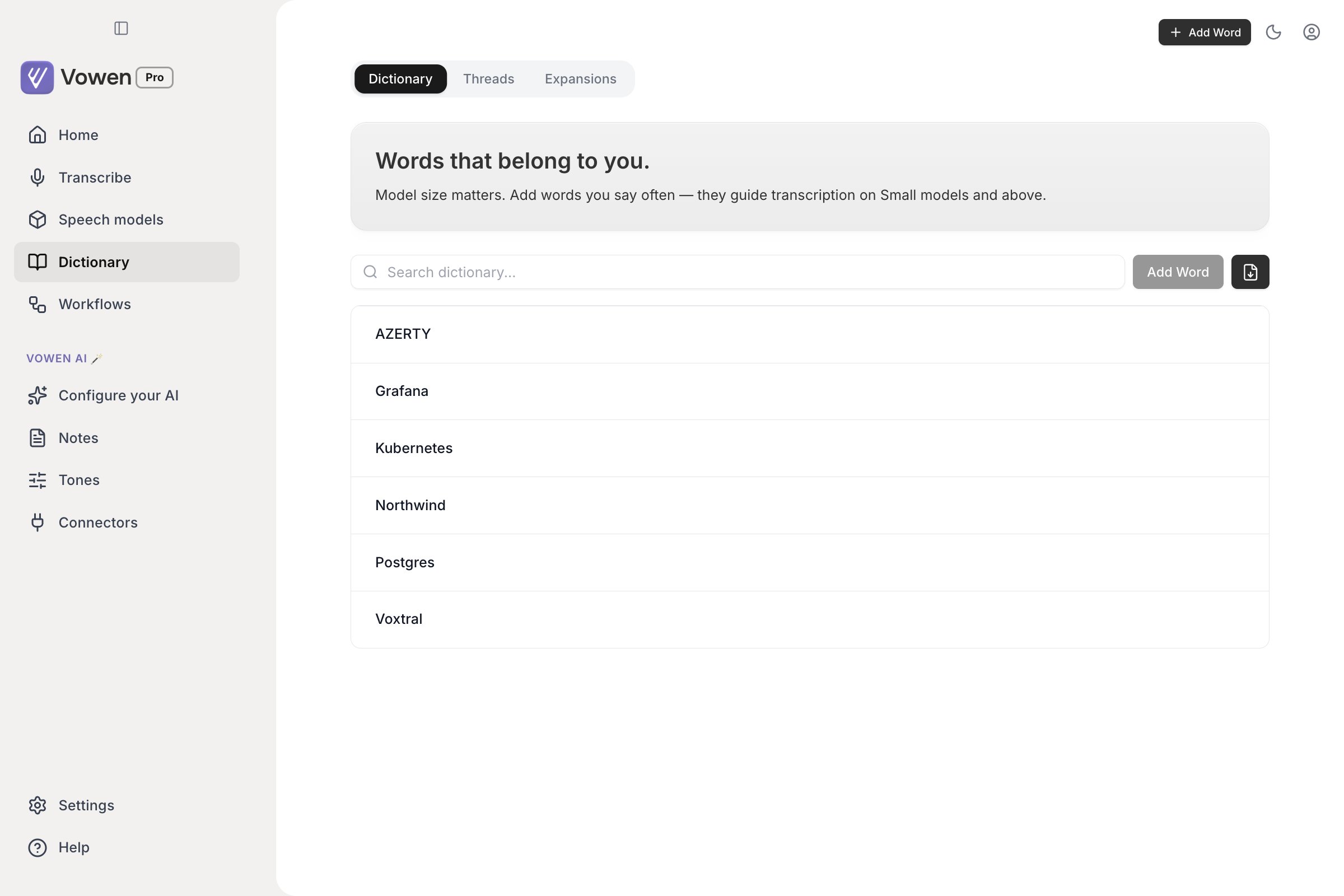
The Dictionary is one list of terms, with search and Add Word above it.
/ or Cmd+F (Ctrl+F on Windows) to jump to it.
There is no limit on how many words you can add, on any plan.
Misspelling aliases
Biasing is only a hint. Even with “Kubernetes” in your dictionary, an engine will sometimes still hand back “cuber netties”. A misspelling is the deterministic half of the entry, an exact phrase that Vowen rewrites to the entry’s canonical text after transcription.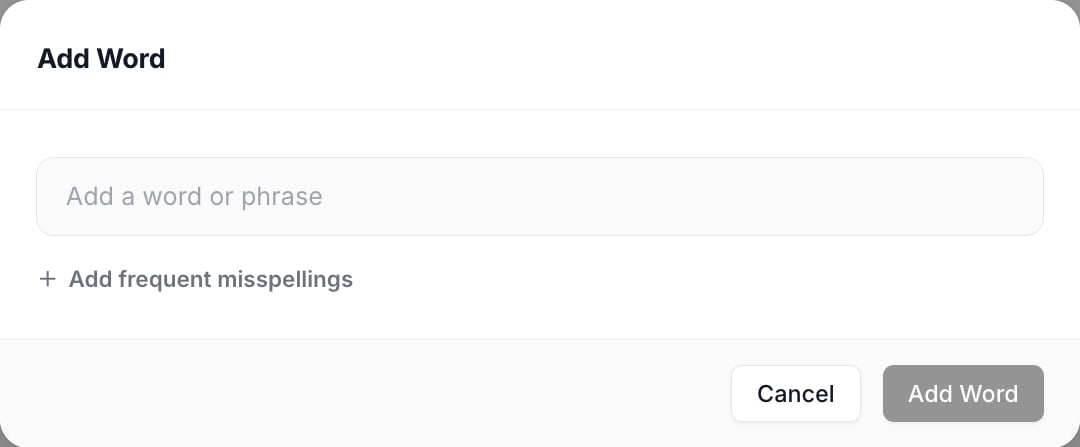
Add Word takes the term itself, and optionally the wrong spellings you actually see.
How misspellings behave:
- Matching is case-insensitive, and anchored to whole phrases, so a misspelling of
calwill not rewrite the middle of “calendar”. - Case-only variants are deliberately allowed. Listing
githubunderGitHubis one of the most useful things you can do, and Vowen keeps it rather than deduplicating it away. - Because this is a rewrite applied after transcription rather than a hint, it works on every engine, including the local models that take no vocabulary at all.
This is the same replacement machinery Threads use. A misspelling belongs to a word you already have in the Dictionary and always resolves to that word’s spelling. A Thread is a standalone rule that can expand a short phrase into anything.
Which engines use your vocabulary
Most cloud engines can steer recognition towards your terms directly, and use your Dictionary well. A few can only take them as a loose hint. Vowen sends your list to each one and stays inside that provider’s limits.The exceptions
These engines receive no vocabulary at all. Your dictionary still corrects their output through misspellings, but it cannot influence what they produce.- Local Whisper Tiny and Base. See the warning below
- Local Parakeet and local Nemotron, on both macOS and Windows
- Sarvam when transcribing a file or a meeting (live dictation does receive your terms)
- Cartesia when transcribing a file (only live dictation receives your terms)
- OpenAI’s diarization model. Turning on Identify Speakers switches OpenAI to
gpt-4o-transcribe-diarize, which takes no vocabulary of any kind, so your whole dictionary is dropped for that transcription - Gemini Live. Live dictation ignores your terms; Gemini file transcription applies them
How terms are prioritized
Every provider has a ceiling, and a long dictionary will hit it. Vowen decides what survives truncation by how much each term matters to you, not alphabetically:- How often you actually say the term. Usage is counted per term as you dictate.
- How recently you said it, then how recently you added it.
Bulk import from CSV
Click the Import from CSV button in the search row (the download icon) to add many words at once.- One word or phrase per row, in the first column
- A
wordheader row is optional and detected automatically - Duplicates are detected and skipped, and the preview tells you how many before you commit
vowen-dictionary-sample.csv with the expected shape.
CSV import handles words only. Misspellings have to be added in the Add Word dialog.
Auto-add corrections
Auto-add corrections is a Pro feature, available on macOS and Windows.
Turning it on
Turn on Auto-add corrections to Dictionary in Settings > General. The row carries a Beta badge and reads:When you correct transcribed text, suggest adding the correction to your Dictionary for improved future recognition. Requires at least one AI provider to be configured.The row stays greyed out and the switch stays disabled until you have connected an AI provider on the Configure your AI page.
What the banner asks
A new word
A new word
Title: Add to Dictionary?, followed by the word you typed. Offered after a single sighting. A dictionary entry is only a hint to the recognizer, so a wrong one costs very little.
A misspelling of a word you already have
A misspelling of a word you already have
Title: Always correct this?, showing the rule as
"Swati" → "Swaathy". Offered only after two sightings, because the result is a permanent find-and-replace applied to every future transcript, and one odd correction is as likely to be you restructuring a sentence as a recurring recognition error.The rules it follows
- One sighting promotes a new word; two are required for a misspelling.
- The two sightings must fall within a 30-day window. Older evidence is treated as stale and does not carry forward, because a problem that genuinely recurs recurs within a month.
- At most five corrections are taken from any single dictation. More than that is a rewrite the diff mis-read, not a set of spelling fixes.
- Dismissing a proposal is permanent. Closing the banner with its X records a refusal for that exact pair and Vowen never asks about it again. Only adding the word yourself in the Dictionary reinstates it.
Related: pass screen as context
A separate feature reads names visible in your current window and passes them to your AI provider so it can repair ones the recognizer misheard. It attacks the same problem as the Dictionary, but it is not part of the Dictionary. Find it on the Configure your AI page, on the Configuration tab, nested under “Enhance transcription with AI” and labeled Pass screen as context. It is macOS-only, and it reads the accessibility tree rather than taking a screenshot, so it needs no Screen Recording permission and makes no extra model call. See Configure your AI.Dictionary, Threads and Text Expander
Tips
- Add the exact spelling and casing you want. That string is both the hint and the replacement target.
- Add the full form and the abbreviation as separate entries when you use both.
- Skip common English words. Only specialized terms are worth the space in a truncated list.
- Keep misspellings specific. A very short misspelling like
calis anchored to whole phrases and will not corrupt longer words, but it will still fire on the standalone word “cal” wherever it appears.