
The Pro plan unlocks webhooks so meeting notes can flow into Slack, Discord, n8n, Zapier, Make, or your own server.
Overview
Vowen fires a webhook when a meeting note is ready. It sends an HTTPPOST with the note’s
transcript, summary, and tags to any URL you configure. Use it to push notes into Slack or Discord,
into an automation platform, or into your own service.
Webhooks fire on meeting notes only. There is no per-dictation webhook. If you want dictation text
to trigger something, use a voice shortcut or the Vowen CLI.
Setup
1
Open the integration
Go to Settings > Meeting Notes > Integrations and click Configure Webhook.
2
Enter your endpoint
Paste the URL that should receive the
POST. This is the only required field.3
Add headers or a signing secret (optional)
Add custom request headers for authentication, and a signing secret if your receiver should
verify that the request really came from Vowen. Both are covered below.
4
Save
Click Save. The integration is enabled as soon as a URL is saved. Disconnect clears the
URL, the headers, and the signing secret in one go.
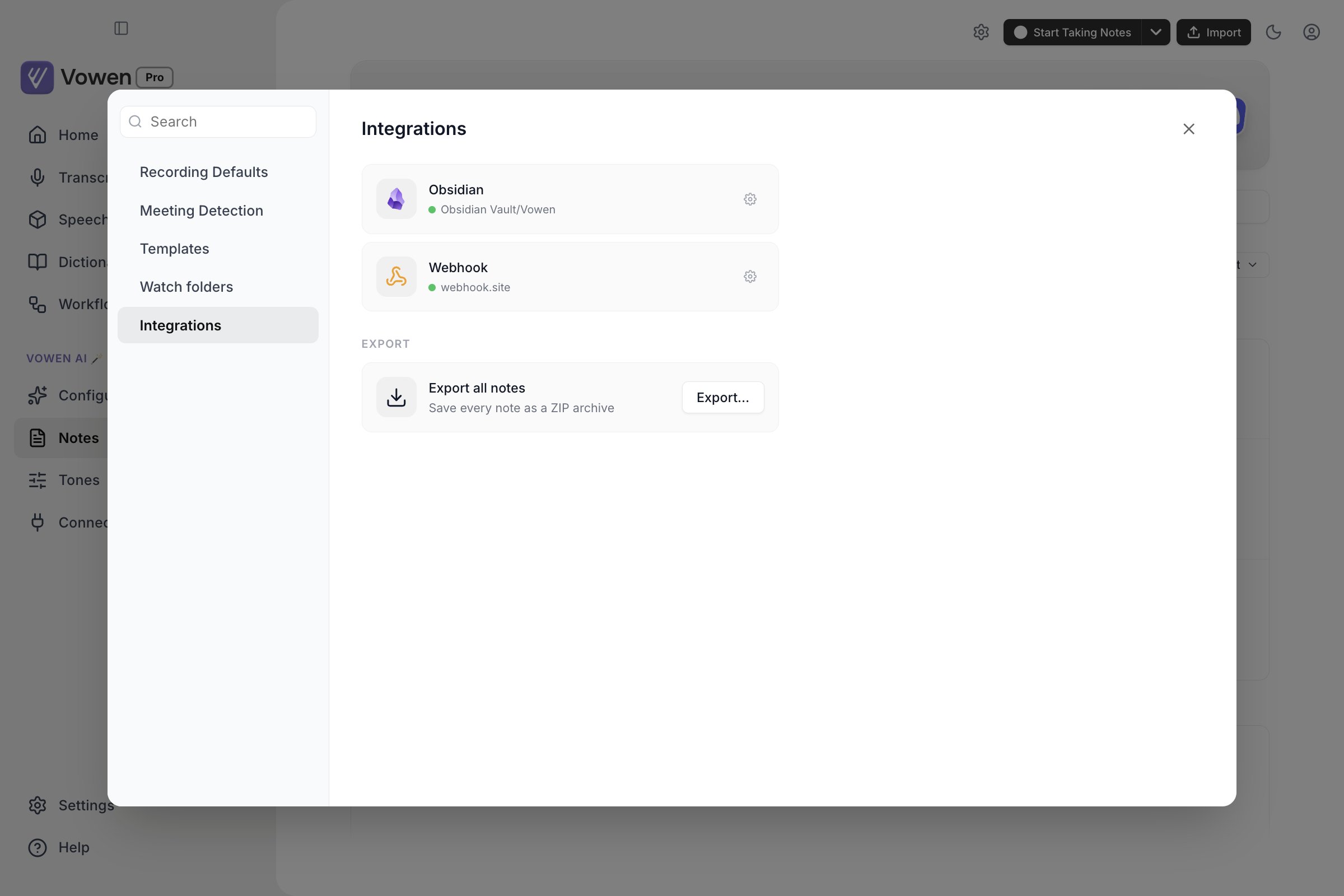
The Webhook card sits beside Obsidian on the Integrations tab. Its gear opens the URL, headers and signing secret.
Payload
For any URL that is not a Slack or Discord webhook, the body is a JSON object: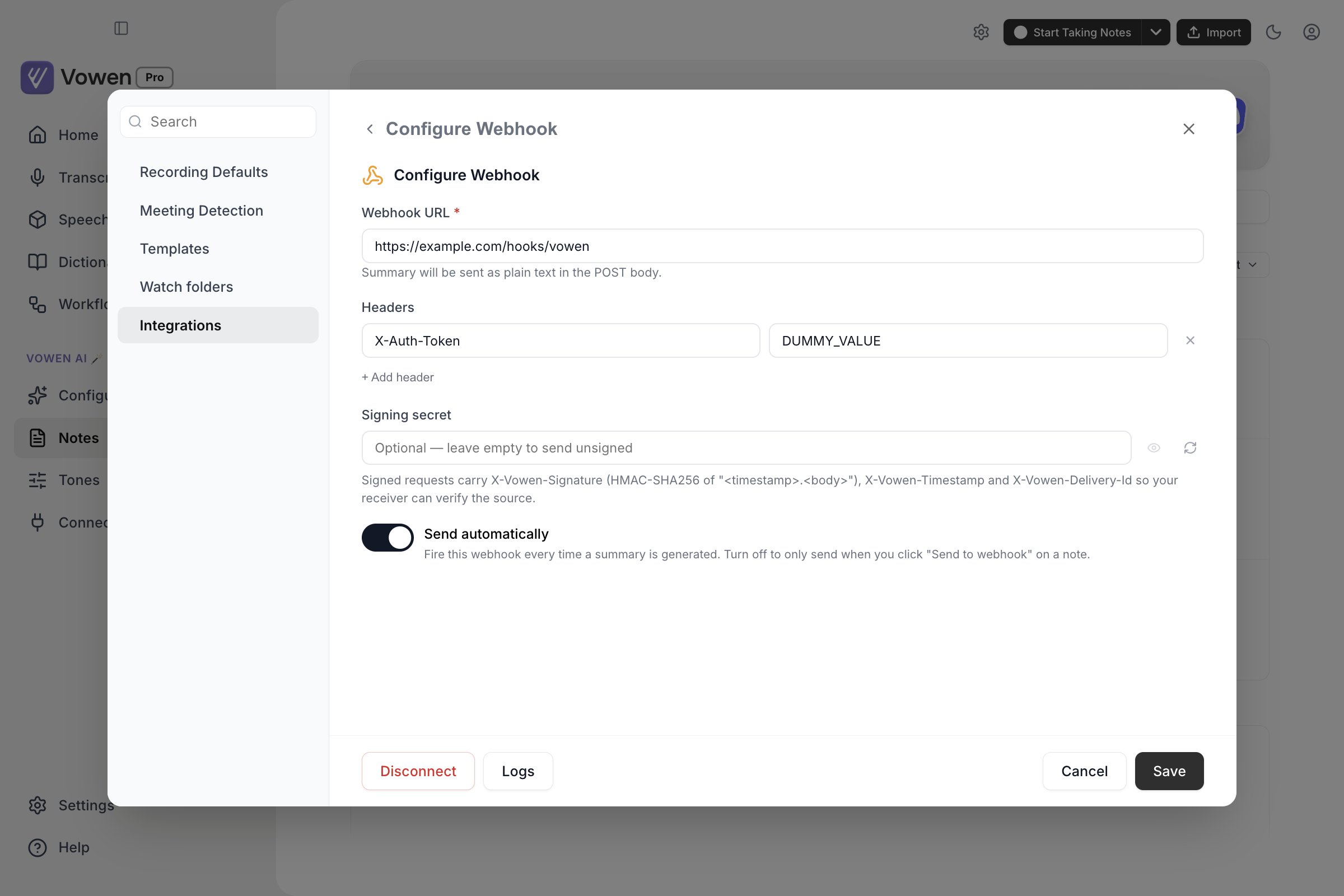
The webhook panel: destination URL, custom headers, an optional signing secret, and whether to fire automatically.
event: what produced this delivery.note.createdwhen a summary finishes generating,note.manual_sendfor the Send to webhook action on a notetrigger:autoormanual, the short form ofevent. Also sent as theX-Vowen-EventheadernoteId: the note’s identifier, as a string. It is the same on every device once cloud sync has run, and it never changes, so use it to connect an automatic delivery with any later manual send of the same note.X-Vowen-Delivery-Ididentifies one delivery;noteIdidentifies the notetitle: the note title at the time of sendingcreatedAt: when the note was created, ISO 8601updatedAt: when the note record last changed, ISO 8601.nullfor notes that have not been edited since updating to the version that introduced itdurationSeconds: length of the recording.nullwhen unknown, for example imported texttemplate/templateId: the summary template’s display name and its stored idhasTranscript/hasSummary: whether the matching text field is non-empty, so you can branch without inspecting the text itselftranscript: the full transcript, with any speaker names you assigned folded into theSpeaker N:prefixessummary: the summary text, with Vowen’s internal citation markers stripped outtags: resolved tag names, not internal IDs. Always present;[]when the note has no tags
transcript, summary and tags are the original payload fields and keep their exact shape, so
receivers built against the three-field body keep working. Every other field is additive.
Content-Type is always application/json and cannot be overridden by a custom header.
A manual send (the Send to webhook action on a note) posts the same shape with the note’s
current transcript, summary and tags, so it can be used to backfill older notes into a receiver.
A note with neither a summary nor a transcript is refused.
Slack and Discord formatting
Vowen detects Slack and Discord webhook URLs automatically. Just paste the URL; there is no format selector to set.Custom headers
Add any number ofkey: value header pairs under Headers. These are useful for bearer tokens,
API keys, or routing headers your endpoint expects. Header values are encrypted at rest on your
device.
Vowen’s own
X-Vowen-* headers and Content-Type are applied after your custom headers, so a
custom header can never shadow them. If you add a header called X-Vowen-Signature, it is
overwritten before the request goes out.Send automatically
The Send automatically checkbox controls whether the webhook fires on its own.- On (default): the webhook fires every time a summary is generated
- Off: nothing fires automatically. Open a note and click Send to webhook to send it by hand
Verifying deliveries with HMAC signing
Set a Signing secret and Vowen signs every delivery so your receiver can prove the request came from your copy of Vowen and was not replayed. The Generate a new secret button produces 32 random bytes as hex; you can also paste your own. The secret is stored encrypted on your device and never leaves it. Only the derived signature is transmitted.Headers
What is signed
The signature is an HMAC-SHA256, keyed with your secret, over this exact string:., then the raw body bytes as sent. The timestamp is inside the
signed string rather than merely alongside it, so a captured request cannot be replayed later with a
fresh timestamp.
Verification example
Delivery logs
Vowen keeps a log of recent deliveries so you can confirm they are landing and debug failures. Click Logs in the Configure Webhook screen to open the Webhook Logs view.- The last 25 deliveries are retained; older entries drop off automatically
- Each row shows Time, Status, Trigger (
autoormanual), Note, and Duration - Expanding a row reveals the endpoint, the payload format (
json,slack, ordiscord), request headers, request body, and response body - Headers named
Authorization,Cookie, orProxy-Authorization, or whose name containskey,token,secret,password, orauth, are stored as***, so a custom auth header you added is never written to the log file - Request and response bodies are truncated at 2048 characters, with a note showing how many were dropped
- Refresh re-reads the log; Clear logs empties it