
Free plan includes built-in expansions plus 1 custom expansion. Pro unlocks unlimited custom expansions.
What is Text Expander?
Type a short trigger like:date anywhere on your computer and Vowen expands it into longer text. It works globally, in any app and any text field.
Built-in Expansions
There are exactly two, and neither can be deleted.Creating Custom Expansions
- Open the Vowen app and click Dictionary in the left sidebar
- Switch to the Expansions tab
- Click + Add Expansion
- Enter your trigger (e.g.,
:addr) and replacement text (e.g., “123 Main Street, Suite 400, New York, NY 10001”) - Click Save
:date and :time are always plain.)
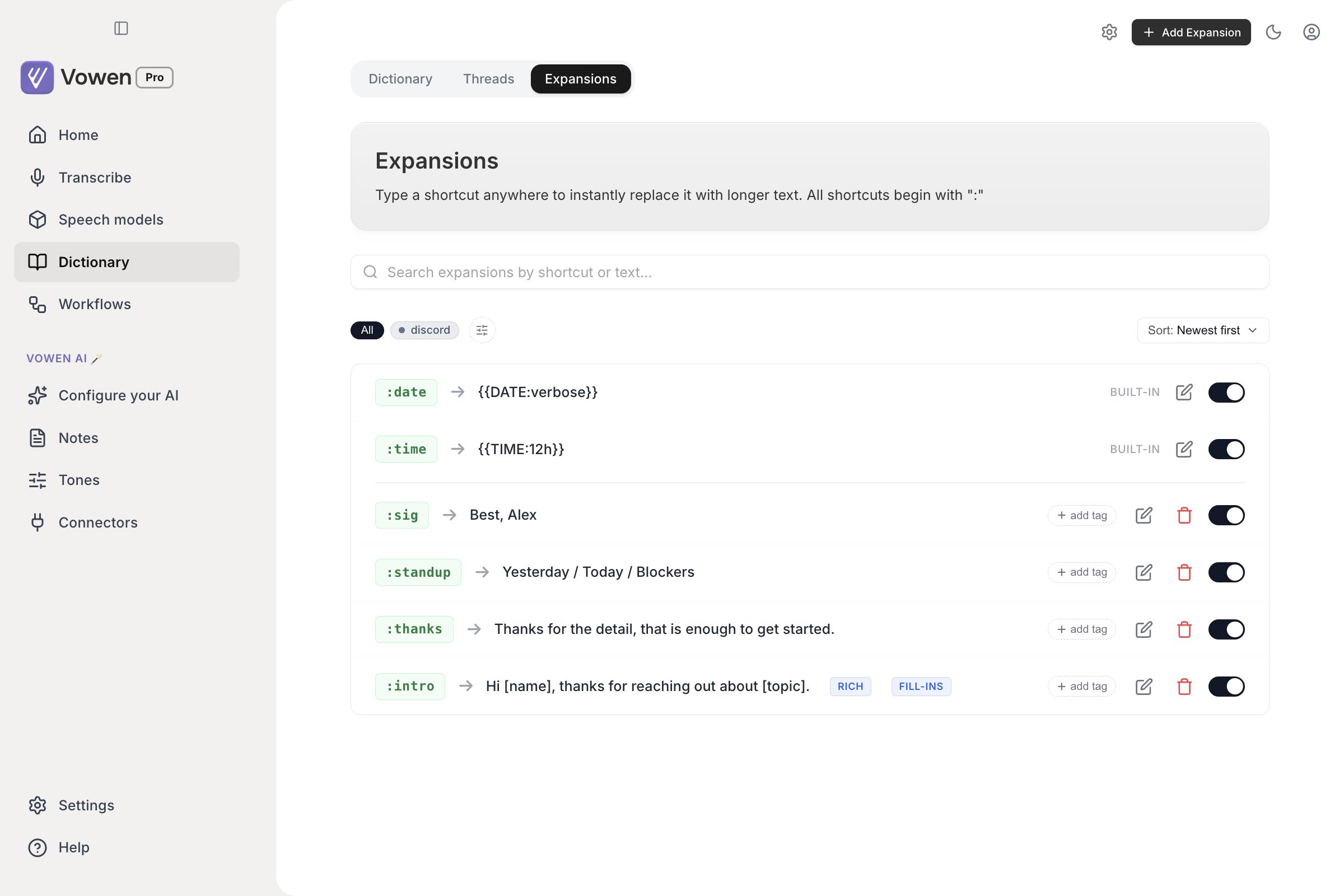
Expansions are the third tab beside Dictionary and Threads. Built-in ones are marked; the rest are yours to edit.
How It Works
- You type the trigger characters (e.g.,
:email) - Vowen detects the completed trigger
- It simulates backspaces to delete the trigger
- It pastes the replacement text
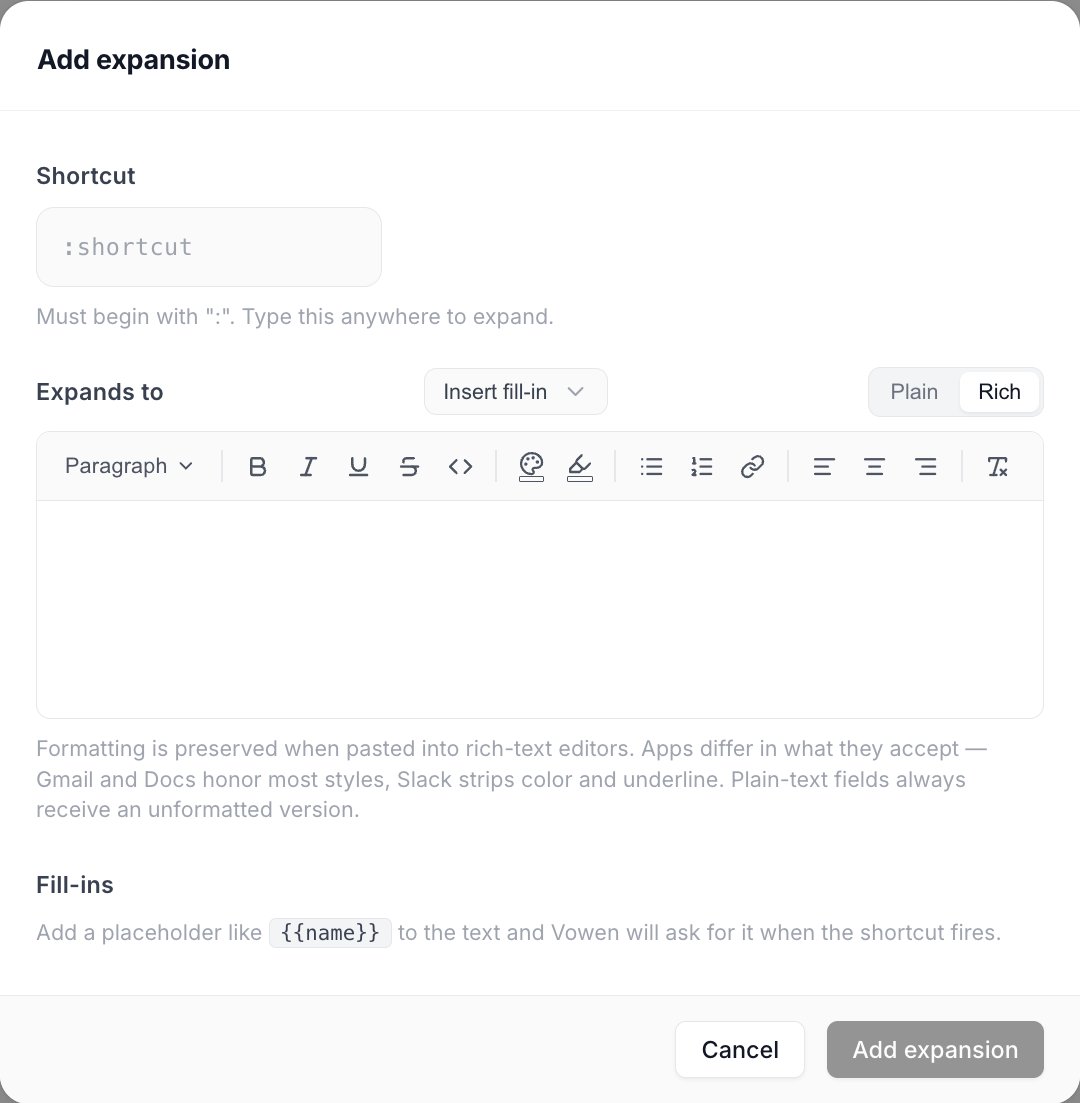
An expansion is a shortcut beginning with a colon and the text it expands into. Fill-ins are declared at the bottom.
Use Cases
- Contact info:
:email→ your email address - Signatures:
:sig→ your full email signature - Boilerplate:
:thanks→ “Thank you for your message. I’ll get back to you shortly.” - Links:
:gh→ your GitHub profile URL - Date/Time:
:date→ today’s date (built-in)
Fill-in Variables
An expansion does not have to be a fixed block of text. Put a{{name}} token anywhere in the
replacement and Vowen opens a small focused form when the trigger fires, collects the values, and
injects the finished text.
:letter opens a form with three fields. Fill them, press Insert, and the completed
letter is pasted into whatever you were typing in.
How the fill-in form behaves
- It opens over the app you were typing in and takes keyboard focus, but never brings the rest of
Vowen forward. Your typed
:shortcutstays visible until you submit. - Fields appear in the order the tokens appear in the text.
- Tab moves between fields, Enter advances (and submits from the last single-line field), Cmd/Ctrl + Enter submits from anywhere, Esc cancels.
- A live Preview underneath shows the finished text as you type.
- Cancelling is a clean no-op. Nothing has been deleted from the target app yet.
Variable types
Configure each token as one of five types.
Every type also has:
- Label: the text shown above the field in the form. Falls back to the token name.
- Required: a toggle. The Insert button stays disabled until every required field is filled.
{{anything}} and get a prompt for it without touching any settings.
The variable library
Variables you want in more than one expansion live in a reusable library, so you define{{client_name}} once and every expansion containing that token picks it up.
The library lives in the Expansions settings modal (see below), on the Variables tab. It
lists each variable with its type, its details, and how many expansions currently use it.
Vowen resolves each token with this precedence:
1
Per-expansion configuration
Anything you customized on that specific expansion wins. The editor shows a Customize for this expansion action, and a Reset to library action to undo it.
2
The global variable library
A library entry with a matching name. Expansions using it show a Library pill, and editing the library entry changes every expansion at once.
3
A plain text field
The fallback when neither of the above matches the token name.
DATE and TIME are reserved and cannot be used as variable names. Renaming a library variable is allowed, but expansions still referencing the old token silently fall back to a plain text field.Date and Time Tokens
Use{{DATE}} and {{TIME}} inside any expansion, not just the built-ins. They resolve
automatically without prompting. Add :key to pick a format. The expansion editor has an
Insert date / time menu that writes these tokens for you.
Date presets
Time presets
An unrecognised key falls back to the default for that token (
iso for dates, 24h for times).
Expansions Settings Modal
Click the gear icon in the window toolbar while the Expansions tab is open. The modal has two tabs:- General: the Show suggestions dropdown toggle.
- Variables: the global variable library described above, with create, edit and delete.
Managing Expansions
- Enable/Disable: toggle individual expansions without deleting them
- Edit: change the trigger or replacement text
- Delete: remove custom expansions (built-ins cannot be deleted)
- Built-in label: shows which expansions are system-provided
- Search: filter the list by shortcut or text with the search bar at the top
- Tags: label expansions with colored tags, then use the tag filter bar (with any/all match modes) and sort options to organize a large library
Suggestions Dropdown
Turn on Show suggestions dropdown on the General tab of the Expansions settings modal (the gear icon in the window toolbar) and Vowen shows a live picker as you type a: trigger. Matching expansions appear in a small list near your cursor. Click one to insert it without stealing focus from the app you’re typing in, which helps when you can’t remember the exact shortcut. It’s off by default.
Expansions with fill-in variables show their tokens as [Label] slots in the picker preview, so you can tell at a glance that choosing one opens a form rather than pasting immediately.
Bulk Import
Building dozens of expansions one-by-one in the app is slow. Prepare a JSON file with all of them (plain text or rich HTML) and import it in one click. See Import & Export Data for the file format and an LLM-ready prompt that converts any source list (spreadsheet, Word doc, wiki) into a ready-to-import file.Behavior Notes
- Expansions are paused during voice recording (won’t interfere with transcription)
- A mouse click resets the trigger buffer (starts fresh)
- Triggers are case-sensitive
- The trigger prefix
:is not configurable currently